
Admin Guide
This guide is for the people who run a HostCraft server: the operators who create hosting accounts, manage resellers and plans, keep mail flowing, watch security, take backups, migrate customers off cPanel and keep the panel itself up to date.
If you are a reseller, read the Reseller guide instead. If you are a customer who owns a hosting account, start with the User Guide.
Who can use the admin area
Section titled “Who can use the admin area”The admin area lives under /admin in the panel. Only two roles can open it:
| Role | What it can do |
|---|---|
| Super admin | Everything a server admin can do, plus manage other administrators on the Administrators page and install a license key. |
| Server admin | Runs the whole server: accounts, resellers, plans, domains, IPs, mail, security, backups, updates, settings and the audit log. |
Resellers, account owners, sub-users and mailbox users who try to open an admin page are sent back to their own area.
Some actions that change or remove things (for example deleting an account, or changing an administrator) ask you to confirm your identity again before they run. Sign in again or confirm with your passkey or authenticator app when prompted, then repeat the action.
The admin sidebar
Section titled “The admin sidebar”| Sidebar item | What it is for | Guide page |
|---|---|---|
| Overview | Live snapshot of accounts, resellers, domains, mail queue, disk, CPU, memory and network, plus license, security and audit summaries. | This page |
| Accounts | Every customer account on this server. Create, suspend, unsuspend and delete. | Accounts, plans, users and resellers |
| Migrate from cPanel | Pull accounts from a live WHM server, or upload a cpmove archive. | Migration |
| Resellers | Reseller pools, pool ceilings and reseller logins. | Accounts, plans, users and resellers |
| Plans | The plan catalogue: limits, price and features. | Accounts, plans, users and resellers |
| Servers | This server's details and services, or every node when the panel runs a cluster. | Servers and cluster |
| Domains | Every domain across every account, with DNS and SSL state. | Domains and IP addresses |
| IP Addresses | The server's IP pool and dedicated IP assignments. | Domains and IP addresses |
| Mail Queue | The Postfix queue and Dovecot version pins. | |
| Mail Deliverability | PTR, blocklists, warmup, bounce rate, spam traps and mail-tester. | |
| Security | WAF, CrowdSec, malware quarantine, RASP, file integrity and the server security policy. | Security |
| Backups | Backup repositories, scheduled jobs, snapshots and the panel's own nightly backup. | Backups |
| WordPress | Every WordPress install on the server, with updates, hardening and vulnerabilities. | Settings, audit, terminal and WordPress |
| Updates | The running HostCraft build, release checks, installs, rollbacks and update policy. | Updates and license |
| License | Tier, entitlements, usage and license key installation. | Updates and license |
| Terminal | A shell as a customer account's system user. | Settings, audit, terminal and WordPress |
| Audit Log | Every state change on the server. | Settings, audit, terminal and WordPress |
| Administrators | Admin operators, their roles and second factors. Super admins only. | Accounts, plans, users and resellers |
| Settings | Hostname, timezone, outbound email, alerts, sign-in policy, API tokens, webhooks and hook scripts. | Settings, audit, terminal and WordPress |
The Overview page
Section titled “The Overview page”Overview is the first page you see after signing in as an administrator. Everything on it comes from live data the daemon reports. There are no projected trends or invented history.
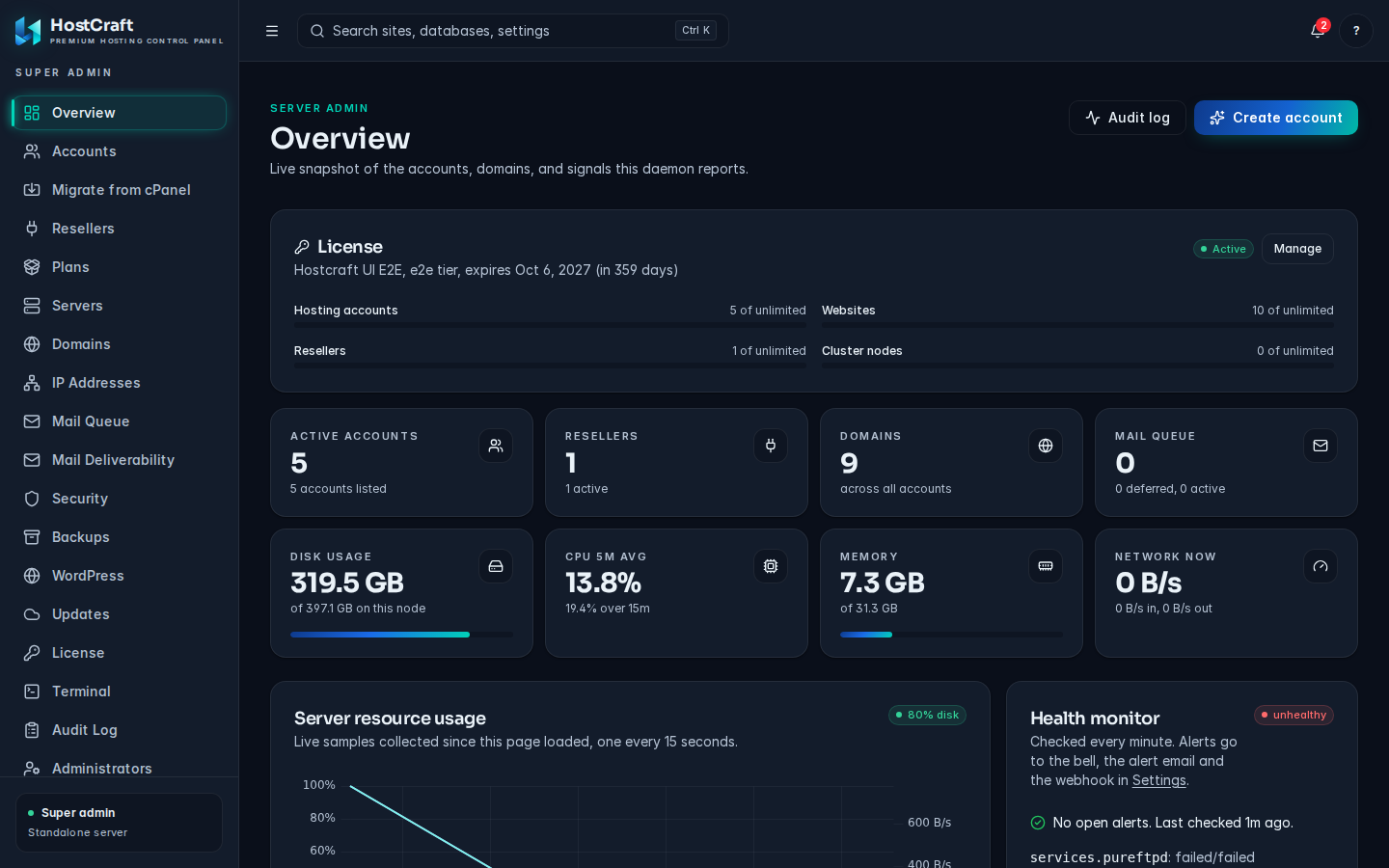
From top to bottom:
- License tile: your tier, license state (for example Free tier, Active or Grace period), the expiry date and usage bars for hosting accounts, websites, resellers and cluster nodes. Click Manage to open the License page.
- Stat cards:
- Active accounts, Resellers (with the number active) and Domains. When the list holds 50 or more items the card shows
50+, because the overview reads the first 50 records only. - Mail queue: messages Postfix is holding, split into deferred and active. Shows
n/awith "mail stack not enabled" when mail is not set up on this server. - Disk usage, CPU 5m avg, Memory and Network now for this server.
- Active accounts, Resellers (with the number active) and Domains. When the list holds 50 or more items the card shows
- Server resource usage: a live chart sampled every 15 seconds while the page is open. It starts empty when you arrive.
- Health monitor, Security and Mail queue depth cards. The Security card shows events, blocks, quarantined files and file integrity alerts from the last 24 hours, or tells you the security stack is not enabled.
- Recently created accounts and Suspended accounts, each with a View all link.
- Updates: the running version, channel, mode and uptime, with a link to the Updates page.
- Recent audit events: the last five state changes, with their trace IDs.
The two buttons at the top right open the Audit log and start Create account.
Licence-gated features
Section titled “Licence-gated features”Licensing only limits creating new things. Websites, mail and DNS keep serving in every license state, and reading data, signing in, SSL renewals, backups, restores of existing data, security actions, suspend and delete are never blocked.
The free tier has caps on hosting accounts, websites, resellers and cluster nodes. These features need a paid license: WordPress Toolkit installs, the mail deliverability suite, resellers and clustering. The exact caps and features for your server are listed on the License page. See Updates and license.
When a create action is refused on license grounds, the dialog shows "This server's HostCraft license blocked the request. Existing sites keep serving." with a View license link.
Conventions used in this guide
Section titled “Conventions used in this guide”- Bold text is a label you see on screen: a button, menu item, field or column.
- The row menu is the three-dot button at the end of a table row.
- Most long-running actions (creating an account, decommissioning a node, installing an update) run as a workflow. The dialog shows each step as it completes. If a step fails, the steps already done are rolled back where that is safe, and the failure is recorded in the audit log with a trace ID.