
Git version control
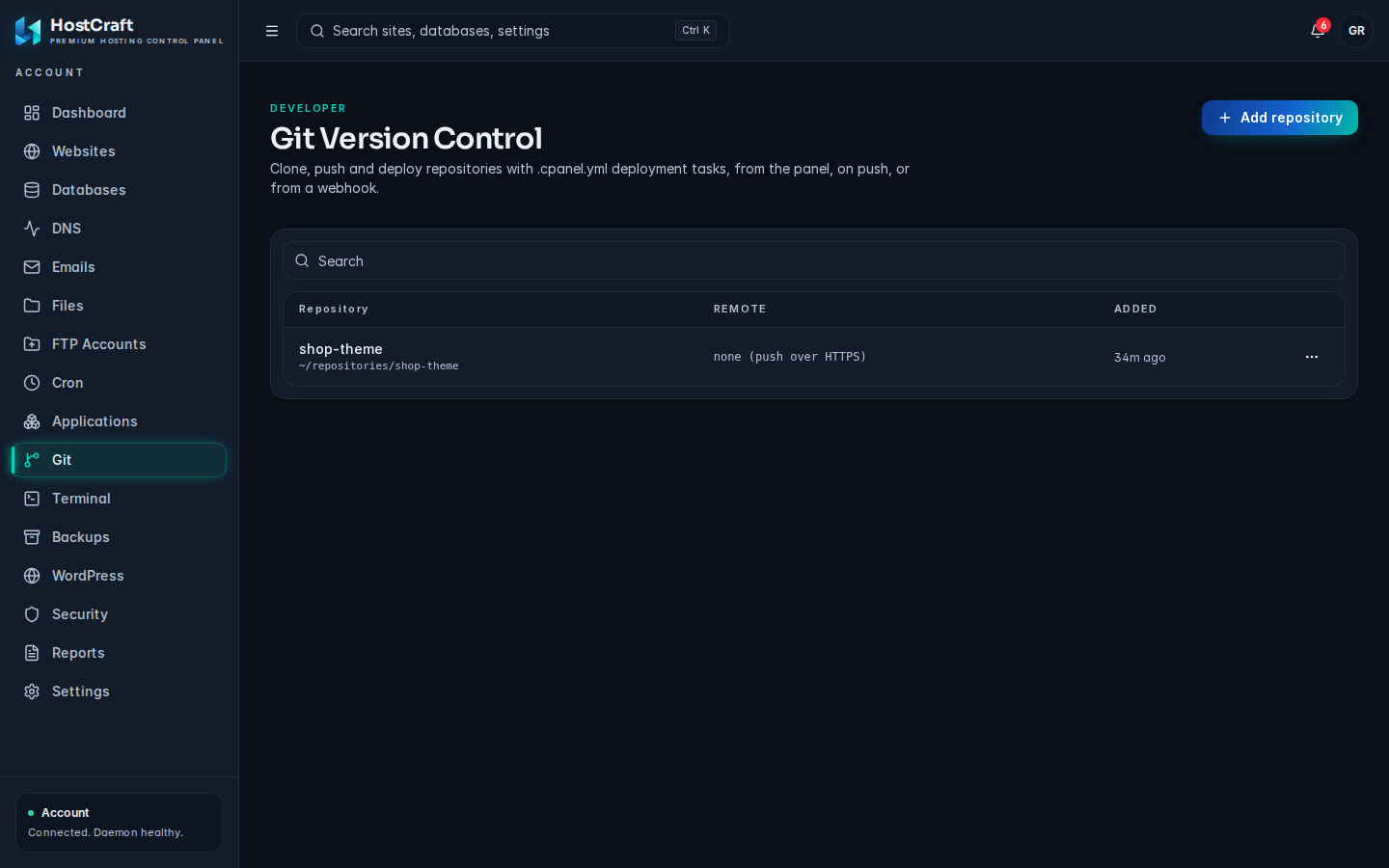
The Git page (titled Git Version Control) is the HostCraft equivalent of cPanel's "Git Version Control". Repositories live in your home directory as normal Git checkouts. Pulls, pushes and deployments run as your account user.
Open it from the sidebar: Git.
Who can use this page
Section titled “Who can use this page”| Role | Access |
|---|---|
| Account owner | Full access to the account's repositories. |
| Sub-user | Sees the page only when the account owner granted Git access. The read-only support preset can view repositories, deployments and URLs but cannot add, pull, deploy, rotate secrets or remove. |
| Server administrator, reseller | Not shown in the admin or reseller areas. |
| Mailbox user | No access. |
The repositories table
Section titled “The repositories table”- Repository: the name and its folder in your home directory. Click the name to open the repository.
- Remote: the clone URL, or "none (push over HTTPS)" for a repository you push to directly.
- Added: when it was added.
Add a repository
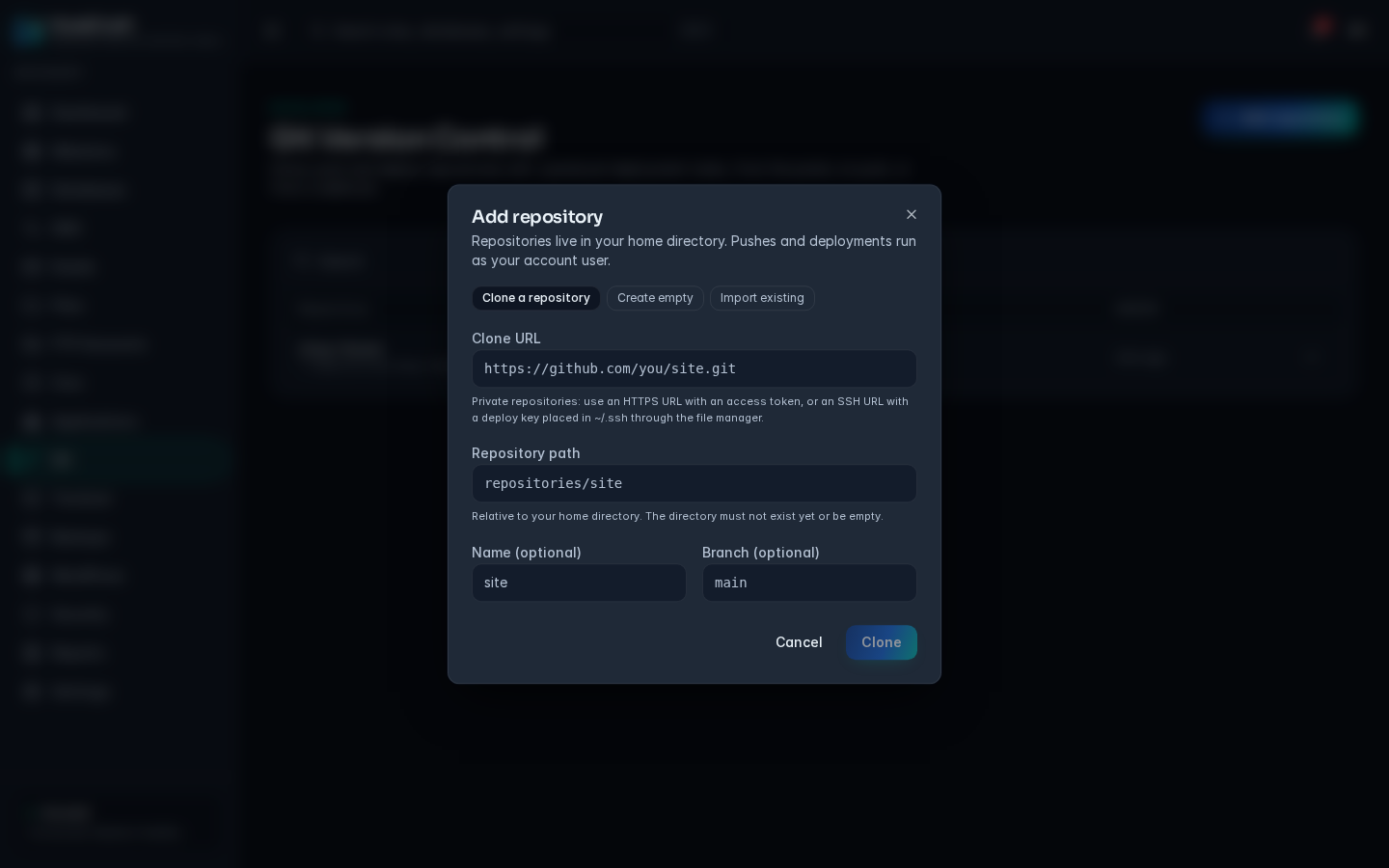
Section titled “Add a repository”Click Add repository and pick one of the three tabs.
Clone a repository
Section titled “Clone a repository”- Enter the Clone URL, for example
https://github.com/you/site.git. HTTPS, HTTP, SSH andgit://URLs work, as does the shortgit@host:pathform. - The Repository path fills itself in as
repositories/<name>. Change it if you like. It is relative to your home directory, and the folder must not exist yet or must be empty. - Optionally set a Name and a Branch (for example
main). - Click Clone.
Private repositories need either an HTTPS URL that includes an access token, or an SSH URL with a deploy key placed in ~/.ssh through the file manager.
Create empty
Section titled “Create empty”Creates an empty repository you can push to from your computer. Enter the Repository path, and optionally a Name and Branch, then click Create.
Import existing
Section titled “Import existing”Registers a checkout that is already in your home directory, for example one carried over from a cPanel migration. Pick it under Checkout found in your home directory (if none are found the list says "No unregistered checkouts found"), optionally give it a Name, and click Import.
Naming rules
Section titled “Naming rules”- Name: 1 to 64 letters, digits,
.,_or-, starting with a letter or digit. - Repository path: letters, digits,
.,_,-and/, relative to your home directory, without hidden folders or... It cannot overlap another managed repository. - Branch: letters, digits,
.,_,-and/.
Manage a repository
Section titled “Manage a repository”Click a repository's name, or choose Manage from its actions menu. A drawer opens with four sections.
Checkout
Section titled “Checkout”Shows the current branch, whether the working tree is clean or has uncommitted changes, whether a .cpanel.yml file is present, the latest commit (hash, message, author and age) and the origin remote. A new empty repository shows "No commits yet. Push to this repository to begin."
Actions
Section titled “Actions”- Update from remote pulls the latest commits from
origin. Greyed out when the repository has no remote. - Deploy HEAD commit runs the
.cpanel.ymltasks for the current commit. Greyed out when there is no.cpanel.yml, or while a deployment is already running. - Check out: when the repository has more than one branch, pick a branch and click Check out to switch to it.
The output of each action is shown below the buttons.
Push and webhook
Section titled “Push and webhook”- Clone and push URL (HTTPS): push to this address from your computer. Sign in with any username and the webhook secret as the password. Pushing to the checked out branch updates the files on the server and runs the
.cpanel.ymldeployment. - Webhook URL: add this as a push webhook on GitHub, GitLab or Gitea. Every push then pulls the changes and deploys. GitHub and Gitea can instead use the bare URL with the secret below as the webhook secret.
- Webhook secret: the token used by both of the above.
- Rotate secret issues a new secret after you confirm. Existing webhooks and saved push passwords stop working until you update them.
Each field has a Copy button.
Deployments
Section titled “Deployments”Lists every deployment with its status (running, succeeded or failed), the commit, how it was started (panel, push or webhook) and when. Click a deployment to see its full log.
Write a .cpanel.yml file
Section titled “Write a .cpanel.yml file”Deployments use the same .cpanel.yml format as cPanel, so files from a cPanel account keep working. Put the file in the repository root:
---deployment: tasks: - export DEPLOYPATH=/home/youruser/public_html/ - /bin/cp index.html $DEPLOYPATH - /bin/cp -R assets $DEPLOYPATH- Tasks run in order as your account user, from the repository folder.
- An
exportline is visible to the tasks after it, so$DEPLOYPATHworks as on cPanel. - A file can have up to 200 tasks, and none may be empty.
- One deployment may run for up to 15 minutes before it is stopped.
Remove a repository
Section titled “Remove a repository”Open the actions menu and choose Remove, then confirm. HostCraft stops managing the repository: the panel record and deploy hook are removed, but the files in its folder are kept.
Limits
Section titled “Limits”Your hosting plan can limit how many repositories an account may have. When the limit is reached, adding another fails with "repository limit reached".
Common problems
Section titled “Common problems”| Message or symptom | Cause and fix |
|---|---|
| already exists and is not empty; use import for an existing checkout | The folder already has files. Choose another path, or use Import existing. |
| is already a managed repository / overlaps managed repository | Pick a path that is not inside, or around, another repository. |
| clone URL scheme must be https, http, ssh or git | Check the URL you pasted. |
| Clone fails with an authentication error | The repository is private. Use an HTTPS URL with an access token, or an SSH URL with a deploy key in ~/.ssh. |
| invalid .cpanel.yml | The file is not valid YAML, deployment.tasks is empty, or a task is blank. Fix the file, commit and deploy again. |
| Deploy HEAD commit is greyed out | Add a .cpanel.yml to the repository root, or wait for the running deployment to finish. |
| Webhook deliveries fail after a while | The secret was rotated. Copy the new Webhook URL or Webhook secret into your Git host. |
| Push is rejected | Sign in with the webhook secret as the password. If the server has uncommitted changes in the checkout, commit or discard them first. |