
Cluster mode
A HostCraft cluster is one panel node plus any number of agent nodes. The same hostcraftd binary runs on all nodes; the mode determines what it does on each box.
Topology
Section titled “Topology”| Mode | What runs | State |
|---|---|---|
solo |
Panel UI, REST and gRPC API, all managed services (nginx, PHP-FPM, MariaDB, etc.) | SQLite |
panel |
Panel UI, REST and gRPC API, cluster management. Managed services optional. | PostgreSQL (required) |
agent |
Managed services (nginx, PHP-FPM, MariaDB, mail, DNS) for the accounts placed on it. Takes orders from the panel node. | Local SQLite with the accounts it hosts. The panel keeps the account records and logins. |
A solo install is the default and requires no cluster configuration. Cluster mode is for operators who need to distribute workloads across multiple boxes.
Nodes talk to each other only over the NATS bus with mTLS. The gRPC API is local to each node (the Unix socket /run/hostcraft/hostcraftd.sock, see Developer reference) and is never used between nodes. On the panel node it exposes the whole cluster surface (ClusterService: nodes, enrolment tokens, decommission with drain, account moves and the event stream), and gRPC calls about accounts placed on an agent are forwarded over the bus exactly like REST calls.
+-------------------------+ | Panel node | | (PostgreSQL backing) | +----------+--------------+ | mTLS (REST enrolment) NATS for event fan-out | +-------------------+-------------------+ | | | +------v------+ +------v------+ +------v------+ | Agent node | | Agent node | | Agent node | | (nginx,PHP, | | (nginx,PHP, | | (nginx,PHP, | | MariaDB, | | MariaDB, | | MariaDB, | | mail...) | | mail...) | | mail...) | +-------------+ +-------------+ +-------------+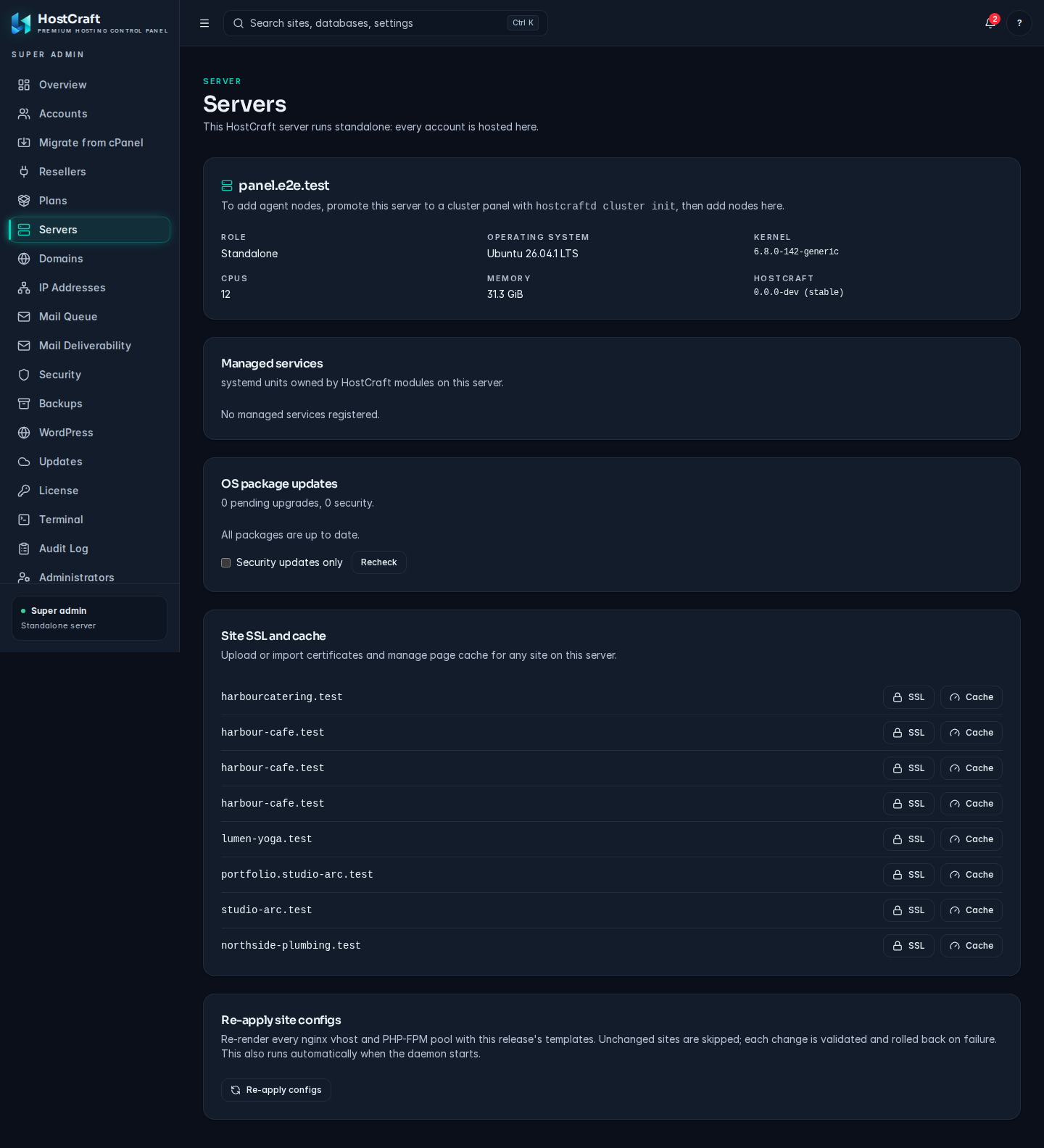
The Servers page. On a standalone server it shows this node; agent nodes appear here once joined.
Promote a solo daemon to panel
Section titled “Promote a solo daemon to panel”Run this on the existing solo box. It writes cluster.mode=panel to config, generates the cluster CA, and prints the enrolment token that agent nodes need to join.
sudo hostcraftd cluster initOutput:
Cluster CA generated at /etc/hostcraft/cluster/ca/Panel certificate issued.CA fingerprint: sha256:aabbccdd...
Enrolment token (valid 24h):  hcj_01ABCDEF...
Add an agent node:  hostcraftd join https://panel.example.com --token=hcj_01ABCDEF...
The CA private key lives at /etc/hostcraft/cluster/ca/ca.key. Back it up offline immediately and restrict access. The panel never needs to re-read the CA key except to sign new node certificates.
cluster init does not move existing data. There is no automated SQLite to PostgreSQL migration tool yet, so promoting a solo box that already hosts accounts is not supported. Build a panel on a fresh install with state.dsn pointing at PostgreSQL from the start.
Mint an enrolment token
Section titled “Mint an enrolment token”Enrolment tokens expire after 24 hours. Generate a new one at any time:
sudo hostcraftd cluster token --role agent# Output: hcj_01ABCDEF...Each token is single-use. After an agent successfully joins, the token is invalidated.
Join from an agent node
Section titled “Join from an agent node”Install HostCraft on the agent box with the standard installer. When prompted for --panel-hostname, use the agent's own hostname (not the panel's). Then run:
sudo hostcraftd join https://panel.example.com --token=hcj_01ABCDEF...The join process:
- The agent generates a 2048-bit RSA key pair.
- It sends a certificate signing request to
/api/v1/cluster/enrolon the panel, authenticated with the token. - The panel verifies the token, signs the CSR with the cluster CA, and returns the signed certificate.
- The agent pins the CA fingerprint (matched against the value printed during
cluster init), persists the node certificate to/etc/hostcraft/cluster/nodes/<node-id>/, and writescluster.mode=agentto/etc/hostcraft/config.yaml. hostcraftdexits. systemd restarts it in agent mode.
After joining, the agent connects to the panel's NATS bus, reports health, and can host accounts.
To verify a node has joined, open Admin -> Servers in the panel, or call GET /api/v1/cluster/nodes.
Health checking
Section titled “Health checking”The panel tracks each agent's health from its heartbeats on the NATS bus. A health check can be triggered for a single node from Admin -> Servers or through the cluster nodes API. Running hostcraftd doctor remotely on an agent is not supported; run it on the agent box itself.
Account placement
Section titled “Account placement”Every account lives on one node. The panel node is the default; an account can instead be placed on any healthy agent. Everything the account hosts runs on that node: the Linux user and home directory, nginx vhosts, PHP-FPM pools, databases and database users, mailboxes, cron jobs, certificates, its DNS zones and its backup jobs. Each node does this work through its own modules, exactly as a solo install would.
The panel keeps the account record, the owner's login and the node it is placed on. The node is shown on the account and in the account count of each server under Admin -> Servers.
Place a new account on a node
Section titled “Place a new account on a node”When creating an account in the panel, server admins pick the server in the Server field of the create dialog. Through the API, pass node_id:
curl -X POST https://panel.example.com:2087/api/v1/accounts \ -H 'Content-Type: application/json' -b cookies.txt \ -d '{"username":"bobsplum","email":"[email protected]","password":"...","node_id":"<agent-node-id>"}'The create workflow creates the owner's login on the panel, then has the agent create the Linux user, home directory, quota and resource slice. If the agent cannot, the workflow rolls back both sides.
How requests reach the node
Section titled “How requests reach the node”The panel UI and API stay the single entry point. When a request concerns an account placed on an agent (domains, sites, databases, DNS, mail, SSL, cron, files, backups, cache, analytics, WordPress, firewall rules and their workflow runs), the panel authenticates it, then sends it to the agent over the mTLS bus with the caller's identity. The agent runs it through its own handlers and returns the response. The account is found from:
- the signed in account owner, sub user or mailbox user,
- the
X-Hostcraft-Accountheader, - the
account_idquery parameter or JSON body field, - or the id in the path, for resources and workflow runs created through the panel on that node.
Lists that are not scoped to one account (for example GET /api/v1/sites as an admin without account_id) show the panel node's own resources. Filter by account_id to see an agent's.
Site DNS A records on a node point at that node's address (dns.default_ip in its config, or the address of its default route when unset).
Move an account to another node
Section titled “Move an account to another node”Open Admin -> Servers -> Account placement -> Move account, pick the account and the target server, or call:
curl -X POST https://panel.example.com:2087/api/v1/cluster/moves \ -H 'Content-Type: application/json' -b cookies.txt \ -d '{"account_id":"<account-id>","target_node":"<node-id>"}'An empty target_node picks the healthy agent with the fewest accounts. The move runs as a workflow with a compensation for every step:
| Step | What happens | On failure |
|---|---|---|
| freeze | The panel refuses changes to the account (423 Locked) until the move ends. |
The account is unfrozen. |
| export | The source archives the home directory and maildirs, dumps every database (with routines, triggers and events) and records users, password hashes, grants, sites, cron jobs, mailboxes, forwarders, certificates and DNS zones. | The source staging files are removed. |
| transfer | The files stream from the source to the target over the bus in 2 MiB chunks, each file checked by SHA-256. | The target staging files are removed. |
| import | The target recreates the account under the same id and username, restores the home directory, creates domains, sites, databases (loading the dumps), database users with their original password hashes and grants, cron jobs, mail domains, mailboxes with their password hashes and messages, forwarders, certificates and DNS records. | The target copy is removed. |
| verify | Every site is fetched through the local web server on both nodes. Each must answer on the target without a server error and with the same body as on the source. | |
| switch_dns | A records that pointed at the source address now point at the target, on both nodes. | The source records are switched back. |
| repoint | The panel records the target as the account's node. Requests now go there. | The account points back at the source. |
| cleanup_source | The source copy (Linux user, home, sites, databases, mail, cron) is removed. A failure here is recorded as a warning on the move; the account already runs on the target. |
Progress (step and bytes copied) is shown live under Account placement and is available at GET /api/v1/cluster/moves and GET /api/v1/cluster/moves/<move-id>. The transfer is resumable: if the panel restarts mid move, the workflow resumes and continues from the bytes already on the target.
Sites keep serving from the source until the switch, and the panel blocks changes for the whole move. Writes the sites themselves make on the source after the export (new uploads, database rows) are not carried over, so put busy sites in maintenance mode for the move.
Moving an account requires both the source and the target to be reachable. An account cannot be moved off a node that is down.
Decommission a node
Section titled “Decommission a node”Decommission is available from Admin -> Servers and through the cluster nodes API (POST /api/v1/cluster/nodes/<node-id>/decommission). It runs a workflow that:
- With
drainset, moves every account off the node, one at a time, each through the move workflow above.target_nodesends them all to one server; when it is empty each account goes to the healthy agent with the fewest accounts. - Tells the agent to stop (skipped when
forceis set, for unreachable nodes). - Revokes the node's mTLS certificate.
- Removes the node from the cluster node list.
curl -X POST https://panel.example.com:2087/api/v1/cluster/nodes/<node-id>/decommission \ -H 'Content-Type: application/json' -b cookies.txt \ -d '{"drain":true,"target_node":"<node-id>"}'A node that still hosts accounts cannot be decommissioned without drain; the request is refused. If a move fails during a drain, that move rolls back, the decommission stops, and the node returns to healthy with the accounts that were not moved still on it. Accounts already moved stay on their new node, and running the decommission again continues with the rest. The panel node itself cannot be decommissioned.
The agent binary keeps running after decommission but all future hostcraftd join attempts for that node require a new enrolment token.
Certificate rotation
Section titled “Certificate rotation”See Security -> Cluster mTLS -> Certificate rotation for the full 4-step saga. Rotation for a single node can be triggered on demand from Admin -> Servers or through the cluster nodes API.
NATS bus
Section titled “NATS bus”HostCraft uses NATS for cluster event fan-out (workflow progress, security alerts, audit events from agents flowing up to the panel).
Embedded nats-server
Section titled “Embedded nats-server”Every release binary has a full nats-server built in. There is no build tag to enable it and no separate NATS install to manage.
- Solo daemons do not start a cluster bus at all.
- Panel nodes start the embedded nats-server on
cluster.nats_addr, with mTLS required, using the cluster CA. - Agent nodes connect to the panel's NATS address as mTLS clients using their node certificate and the pinned CA.
The cluster bus is only selected for panel and agent modes. Any other cluster mode reaching the bus setup fails at boot with an error rather than falling back to a local stand-in.
Configure cluster.nats_addr in each node's config.yaml to point at the panel node's NATS address (or a dedicated NATS cluster for high-availability deployments).
Agents need outbound TCP access to:
| Port | Purpose |
|---|---|
| 7700 | Panel REST API |
| 4222 | NATS (embedded nats-server on the panel) |
Rolling updates across versions
Section titled “Rolling updates across versions”Panel version N supports agents at versions N-1 and N during rolling updates. The update manifest carries a min_agent_version field. Agents older than that field receive an upgrade prompt and are marked degraded in the cluster health view but continue to function.
Rolling update flow:
- Panel updates first, with backwards compatibility for the previous agent version.
- Agents update in batches (configurable, default five at a time) within the operator-defined update window.
- Run
hostcraftd doctoron each agent after it updates.
Failure modes and recovery
Section titled “Failure modes and recovery”Panel node unreachable
Section titled “Panel node unreachable”Agents enter a degraded-autonomous mode. They continue serving existing sites but refuse to accept new orders. No new accounts, sites, or DNS changes are accepted. Workflow runs that were mid-saga when the panel went down are paused and resume automatically when the panel returns.
Agent node unreachable
Section titled “Agent node unreachable”The panel marks the node as unhealthy after three consecutive failed health checks (configurable). Workflow runs targeting the unavailable agent are paused. The panel does not automatically move accounts to other agents. A move needs the source node reachable, so bring the node back (or restore it from backup) before moving or draining its accounts.
Recovering a lost panel
Section titled “Recovering a lost panel”- Restore the PostgreSQL database from backup.
- Run a fresh HostCraft install on a replacement box.
- Point
state.dsnat the restored database. - Restore
/etc/hostcraft/cluster/(including the CA key) from your offline backup so agents keep trusting the panel. - Start
hostcraftd. Agents whose pinned CA fingerprint matches reconnect automatically.
Migrating from SQLite to PostgreSQL
Section titled “Migrating from SQLite to PostgreSQL”Not supported yet. There is no hostcraftd db migrate-to-postgres command. A panel must be installed against PostgreSQL from the start.