
HostCraft's mail stack is Postfix, Dovecot, Rspamd and SnappyMail. Two admin screens cover the server side of it: Mail Queue and Mail Deliverability. Mailboxes, forwarders and autoresponders are managed per account by the account owner (see Email).
Who can use these pages: server admins and super admins. The mail deliverability suite needs a license that includes it.
Mail queue
Section titled “Mail queue”Open Mail Queue. The page is titled Mail queue and shows the Postfix queue across every account.
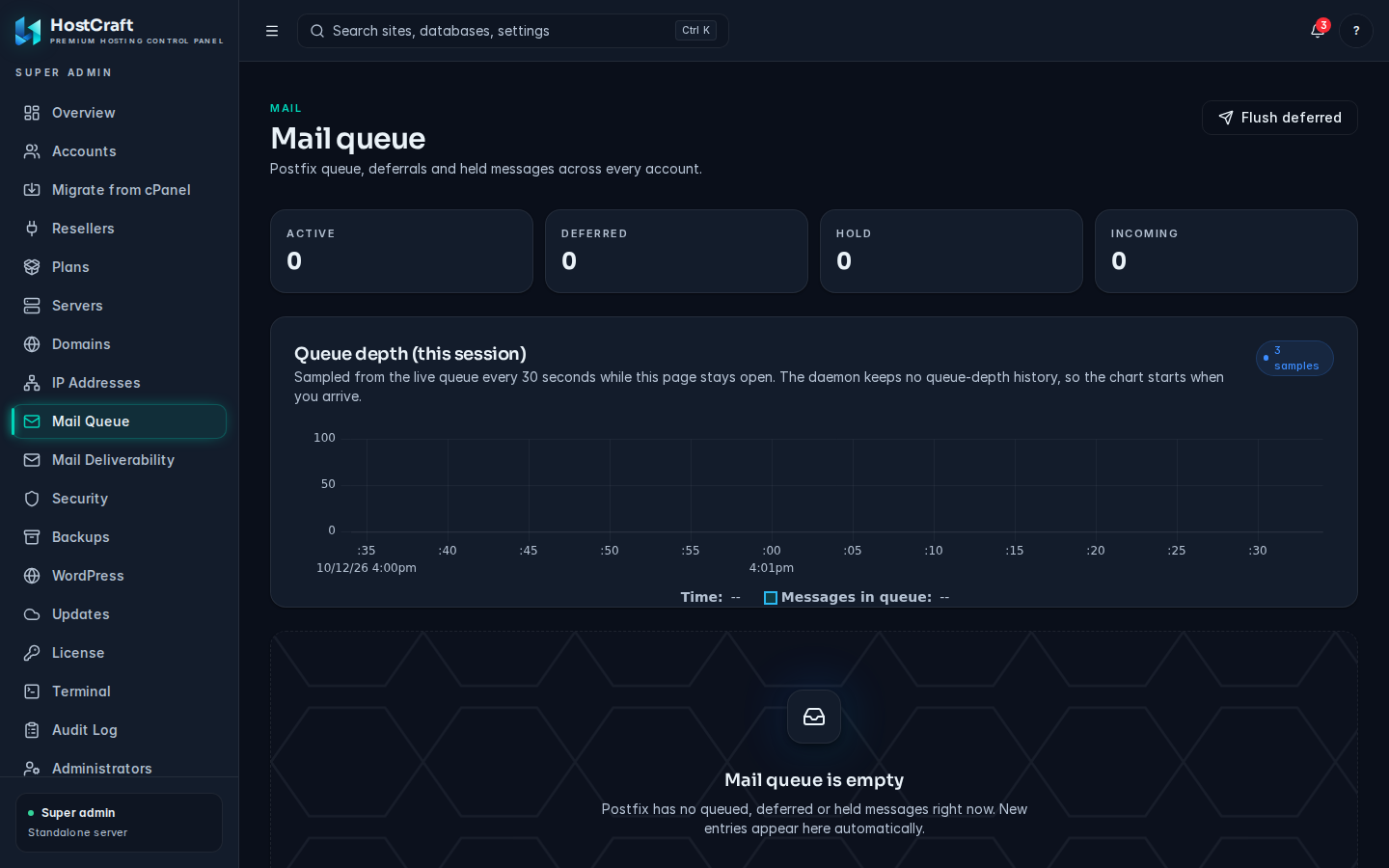
If the page shows Could not load the mail queue, the mail stack is not set up on this server or the daemon could not read the queue. Click Retry after fixing the cause.
State counters
Section titled “State counters”Four counters show how many messages are in each Postfix queue:
- active: being delivered now.
- deferred: delivery failed temporarily and will be retried.
- hold: held by policy and not retried until released.
- incoming: just received and not yet processed.
A growing deferred count usually means a remote server is refusing mail, or this server is on a blocklist. Check Mail Deliverability.
Queue depth (this session)
Section titled “Queue depth (this session)”A chart of the number of queued messages, sampled every 30 seconds while the page stays open. The daemon keeps no queue history, so the chart starts when you open the page and appears after the second sample.
The queue table
Section titled “The queue table”| Column | Meaning |
|---|---|
| Queue ID | Postfix's ID for the message. |
| Sender | The envelope sender. |
| Recipients | The first recipient, with "+N more" when there are several. |
| Size | Message size. |
| State | active, deferred, hold or incoming. |
| Queued | How long ago the message was queued. |
| Last error | The last delivery error, or "No errors". Hover to see the full text. |
Filter by state with the chips at the top of the table, and search by sender, recipient or queue ID. The page fetches up to 500 entries.
Flush deferred mail
Section titled “Flush deferred mail”Click Flush deferred (top right) to ask Postfix to retry every deferred message now. A message confirms how many were requeued. Flush after you have fixed the cause (for example after being delisted from a blocklist); flushing alone does not fix a refusal.
Delete messages
Section titled “Delete messages”- Click the bin icon on a row and confirm to delete that message.
- Tick several rows and choose Delete selected.
Deleted messages are gone for good and are not bounced to the sender. This is the right tool for clearing a spam run from a compromised mailbox: search for the sender, select all and delete. Then change that mailbox's password.
Dovecot version pins
Section titled “Dovecot version pins”The Dovecot version pins card at the bottom controls the config and storage versions written to dovecot.conf on Dovecot 2.4 and newer. Package upgrades do not change them.
- Installed Dovecot shows the running version. Pins only apply on 2.4 and newer; on older versions the card says so and Save pins stays disabled.
- Config version and Storage version: enter a dotted version such as
2.4.1. - Click Save pins. You see "Pins saved and Dovecot configuration reloaded." or, if the change waits for the next mail configuration apply, "Pins saved. They take effect on the next mail configuration apply."
Mail deliverability
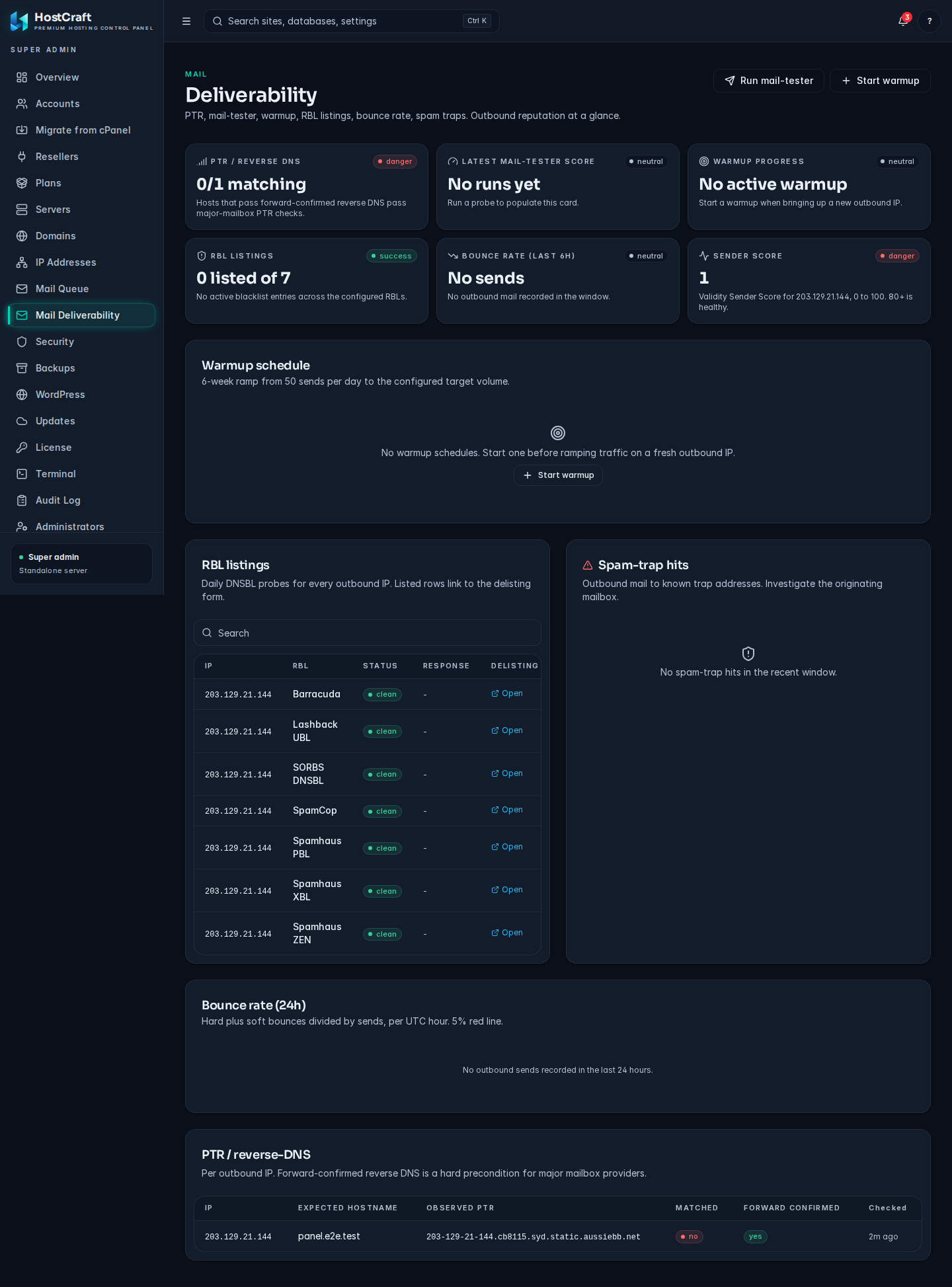
Section titled “Mail deliverability”Open Mail Deliverability. The page is titled Deliverability and gives you outbound reputation at a glance. Its data comes from live probes (DNS, blocklist lookups and mail-tester.com). When a probe fails, its card shows Failed to load with a Retry button rather than stale numbers.
Summary cards
Section titled “Summary cards”| Card | What it shows | Healthy looks like |
|---|---|---|
| PTR / reverse DNS | How many outbound IPs have matching, forward-confirmed reverse DNS. | All matching. |
| Latest mail-tester score | The last mail-tester.com score out of 10, or Running while a test is in progress. | 9 or more. |
| Warmup progress | Today's send limit against the target for the IP being warmed up. | Steady daily increases. |
| RBL listings | How many blocklist checks list one of your IPs. | 0 listed. |
| Bounce rate (last 6h) | Hard plus soft bounces divided by sends. | Under 2 percent. 5 percent or more harms reputation. |
| Sender Score | Validity Sender Score for the main outbound IP, 0 to 100. | 80 or more. |
PTR / reverse DNS
Section titled “PTR / reverse DNS”The table lists each outbound IP with Expected hostname, Observed PTR, Matched and Forward confirmed. Major mailbox providers reject or junk mail from IPs without forward-confirmed reverse DNS.
To fix a mismatch, ask whoever controls the IP (usually your hosting provider or data centre) to set the PTR record to the expected hostname, and make sure that hostname has an A or AAAA record pointing back to the same IP.
RBL listings
Section titled “RBL listings”Daily DNS blocklist probes for every outbound IP. Each row shows IP, RBL, Status (listed or clean), the blocklist's Response, a Delisting link and when it was Checked.
When an IP is listed:
- Find and stop the cause first (a compromised mailbox or a form sending spam). Use Spam-trap hits and the Mail queue to find it.
- Follow the Delisting link and submit a request.
- Wait for the next daily sweep to confirm the listing has cleared.
Spam-trap hits
Section titled “Spam-trap hits”Outbound messages sent to known spam-trap addresses, with Detected, Sender, Trap recipient, Source and Queue ID. A hit means the sending mailbox is mailing addresses that were never opted in. Investigate that mailbox.
Bounce rate (24h)
Section titled “Bounce rate (24h)”A bar per UTC hour for the last 24 hours, green under 2 percent, amber from 2 percent and red from 5 percent, with totals for hard bounces, soft bounces and sent messages. Hover a bar to see the exact numbers for that hour.
Run a mail-tester probe
Section titled “Run a mail-tester probe”- Click Run mail-tester.
- Choose the Domain to send from.
- Click Run probe.
HostCraft sends a probe message to mail-tester.com and polls for the result. A run takes a few minutes; the dialog refreshes itself until the score arrives. The result shows the overall score and the breakdown for SPF, DKIM, DMARC, Content and Blocklists, plus the test ID.
Warm up a new outbound IP
Section titled “Warm up a new outbound IP”A new IP with no sending history is treated with suspicion by mailbox providers. Warmup ramps its daily send limit over 6 weeks, from 50 sends per day up to your target.
- Click Start warmup.
- Outbound IP: the new address.
- Target volume (messages per day): defaults to 50000.
- Click Start warmup.
The Warmup schedule card shows each schedule with its phase (running, paused, completed), "Day N of 42" and today's limit against the target. The daemon advances the schedule automatically each day. Use Pause, Resume or Cancel as needed; cancelling stops the ramp immediately. See also the IP warmup runbook.
How the limit is enforced
Section titled “How the limit is enforced”Each outbound IP sends through its own Postfix transport, and the warmup limit is a hard daily cap on that transport's mail:
-
Which IP sends. Mail from a domain goes out on the dedicated IP of its account (or of its site, when the site has its own). Domains of accounts without a dedicated IP use the shared IP, and so does mail sent as
<user>@<mail hostname>. Assign IPs on the Domains and IPs page. -
Behind 1:1 NAT. Postfix binds the private address on the network card and greets receivers with the reverse DNS name of the public address (or the mail hostname until a forward confirmed PTR check passes). Start the warmup on the public address.
-
What counts. The cap counts recipients, not messages: a message to 3 people uses 3 of the day's limit, because each recipient is a separate delivery the receiving providers see. Rspamd counts mail from the domains on that IP (by the envelope sender, the same address that picks the IP) when it is:
- sent by an authenticated mailbox user (mail clients, webmail), or
- sent by website code on the server: PHP
mail(), WordPress contact forms, cron jobs and anything else that uses the local sendmail.
-
What does not count. Mail arriving on port 25 (from the internet or from the server itself) that merely claims one of those domains, bounces and other notices Postfix generates itself, and the panel's own notification mail (password resets, alerts) sent through the local sendmail with the panel's sender address. Mail sent with the local sendmail without a
-fsender uses<user>@<mail hostname>; it goes out on the shared IP and counts against the shared IP's warmup, if one is running. -
One limit per IP. All domains on an IP share that IP's single daily limit. Most accounts have no dedicated IP, so during a warmup of the shared IP every one of them draws from the same limit.
-
Over the cap. Half of the limit is available at once and the rest refills over the day, so no 24 hour window exceeds it. Once today's limit is reached, further messages are deferred with a temporary (4xx) error, never rejected or bounced:
- Mail clients and SMTP scripts get the 4xx and retry later.
- Website mail is accepted straight away (
mail()returns true and the page does not wait), then waits in Postfix's maildrop and is retried about once a minute until the limit allows it. The Mail queue page andmailqshow it with the sender and recipients. - A single message with more recipients than half of today's limit can not fit in the bucket and waits until the limit grows or the warmup ends.
Mail already sent today keeps counting when the limit changes (the schedule advances, or a warmup is restarted with a new target), so a raise only adds the difference. Pausing keeps the current day's limit in force. If rspamd itself is down, mail is accepted without being counted rather than held, so the panel's alerts about the outage still go out.
-
Website mail needs no setup. PHP sites run sandboxed, which stops the normal sendmail from queueing mail, so their
sendmail_pathishostcraftd sendmail: it hands the message to the panel daemon, which runs the real sendmail as the site's account user.mail()works for every PHP-FPM and FrankenPHP site out of the box. -
When it lifts. A completed or cancelled warmup removes the cap.
-
Licence. Cap enforcement needs the Mail deliverability licence feature. Without it, mail still leaves on the right IP but no cap applies.
The daemon re-checks routing and limits whenever a warmup starts, pauses, resumes, advances or is cancelled, when an IP is assigned or released, when an account, domain or subdomain is created, when mail is enabled or disabled for a domain, when a domain or account is deleted, within a minute of a licence change, and every hour as a backstop, so a newly assigned IP takes over as soon as the assignment finishes. Only IPv4 addresses that are present on a network interface get a transport, and those transports deliver over IPv4 only so the source address always matches; anything else falls back to the shared IP.
Who may send as which domain
Section titled “Who may send as which domain”On shared hosting one customer must not be able to send mail as another customer's domain (it would also leave on the other customer's IP and use up its warmup limit). Hostcraft enforces this on every way mail can enter the server:
- Website code and cron (local sendmail). An account may use as envelope sender (
-f, ormail()'s fifth argument) only addresses at domains it owns: its primary, addon and parked domains and their subdomains, whether or not mail is hosted for them here. Mail without a-fsender is sent as<account user>@<mail hostname>and is always allowed. Anything else is refused:mail()returns false, nothing is queued and nothing is counted against any IP. Postfix enforces this per system user (local_login_sender_maps);root(the panel itself, system cron) and Dovecot'svmail(Sieve redirects keep the original sender) may use any sender, every other system user only its own name. A new domain or subdomain is allowed within seconds of being created. - Mail clients and webmail (ports 587 and 465). Sending requires logging in as a mailbox, and the mailbox may send only as its own address (
reject_sender_login_mismatch). Forwarders and aliases are not usable as sender addresses. - Port 25. Port 25 never relays without logging in, not even for connections from the server itself (
127.0.0.1or its own IPs): it accepts mail only for domains hosted here. A script that used to relay throughlocalhost:25must usemail()/ sendmail, or log in on port 587 with a mailbox.
Common mail problems
Section titled “Common mail problems”| Symptom | Likely cause and fix |
|---|---|
| Deferred count keeps rising, last error mentions a blocklist | One of your IPs is listed. Check RBL listings, fix the cause, request delisting, then Flush deferred. |
| Deferred with "PTR" or "reverse DNS" in the error | Reverse DNS is missing or wrong. Fix it with your IP provider (see PTR / reverse DNS). |
| Mail-tester score low on SPF, DKIM or DMARC | The sending domain's DNS records are missing or wrong. Check the domain's DNS zone. |
| Sudden spike in queued mail from one sender | Probably a compromised mailbox. Delete the queued messages for that sender and reset the mailbox password. |
| Mail queue page cannot load | The mail stack is not set up on this server. |