
Operations
This page covers day-2 operations: routine monitoring, interpreting doctor output, updating, rolling back, and recovering the panel state itself.
hostcraftd doctor
Section titled “hostcraftd doctor”Run doctor first on any misbehaving box. It is also the final health check after every update.
sudo hostcraftd doctorExit code 0 means all probes passed. Any non-zero exit means at least one probe failed; the output names the probe and the recommended fix.
Probe reference
Section titled “Probe reference”| Probe | What it checks | Common fix |
|---|---|---|
nginx |
nginx module reports healthy (service running, config applied) | nginx -t, then systemctl restart nginx |
phpfpm |
Each provisioned PHP-FPM pool is running | systemctl restart php<ver>-fpm |
caddy |
Caddy (panel TLS front) is running | journalctl -u caddy -n 100 |
account |
Account module state is consistent | Check journalctl -u hostcraftd for account errors |
domain |
Domain module state is consistent | Check journalctl -u hostcraftd for domain errors |
web |
Site vhosts match panel state | Check journalctl -u hostcraftd for web errors |
security |
Aggregate of the security stack (WAF, CrowdSec, ClamAV, FIM, network monitor) with a per-component breakdown | Restart the failing component's service, e.g. systemctl restart crowdsec |
Log paths
Section titled “Log paths”| Source | Location |
|---|---|
| Daemon (structured slog) | journalctl -u hostcraftd (canonical; always query this first) |
| Daemon (mirror) | /var/log/hostcraft/daemon.log |
| nginx | /var/log/nginx/access.log, /var/log/nginx/error.log, per-site under /var/log/nginx/sites/ |
| PHP-FPM | /var/log/php<ver>-fpm.log |
| Postfix | journalctl -u postfix, /var/log/mail.log |
| Dovecot | journalctl -u dovecot, /var/log/dovecot.log |
| Rspamd | /var/log/rspamd/rspamd.log |
| MariaDB | journalctl -u mariadb, /var/log/mysql/error.log |
| PowerDNS | journalctl -u pdns |
| ClamAV | journalctl -u clamav-daemon, /var/log/clamav/clamav.log |
| CrowdSec | journalctl -u crowdsec, cscli decisions list |
| Redis | journalctl -u redis-server |
| Audit log | hostcraftd audit search (panel state, not files) |
| Caddy | journalctl -u caddy |
Background tickers
Section titled “Background tickers”The daemon runs several background goroutines that fire on a schedule. Each is logged at info level when it starts and finishes. If a ticker is consistently failing, it appears in hostcraftd doctor output.
| Ticker | Default interval | Purpose |
|---|---|---|
| Mail deliverability: PTR check | 6 hours | Verifies PTR matches HELO for all outbound IPs |
| Mail deliverability: RBL scan | 24 hours | Checks 7 RBLs for the server's outbound IPs |
| Mail deliverability: mail-tester | 24 hours | Submits a test message and records the score |
| Mail deliverability: Sender Score / Talos | 24 hours | Queries reputation APIs for outbound IPs |
| Cluster health check | 5 minutes | Pings all registered agent nodes (cluster mode only) |
| Workflow resume | 30 seconds | Finds paused or interrupted workflow runs and resumes them |
| Audit retention sweeper | 24 hours | Deletes audit log entries older than the configured retention period |
| WP vuln NVD refresher | wp_vuln.scan_interval_hours (default 24h) |
Downloads and caches the NVD CVE feed |
Health monitoring and alerts
Section titled “Health monitoring and alerts”hostcraftd runs a health watcher that samples every module's health check, the filesystems holding /, /home and /var, and the panel self-backup status once a minute. It raises a notification on each transition:
| Condition | Alert | Clears when |
|---|---|---|
| A module reports unhealthy on 2 consecutive samples (a check that takes over 10 seconds counts as unhealthy) | critical | the module reports healthy or degraded |
| A filesystem is 90% full or more | critical | usage drops below 85% |
| A panel self-backup run failed | critical, once per failed run | the next run succeeds |
Certificate expiry (30, 7 and 1 days), account backup failures and update failures are alerted by their own modules.
Alerts land in the panel bell and go to the alert email and webhook set in Server admin, Settings, Notifications. Configure outbound SMTP there too, or emailed alerts cannot be delivered. Each incident is sent once: a recovery notice follows when it clears. The current state is on the Server admin overview (Health monitor card).
Endpoints for external monitoring:
GET /healthz: liveness, 200 while the process answers.GET /readyz: readiness, 200 when no module is unhealthy, 503 otherwise or before the first sample. Unauthenticated; it reports counts only, never module names.GET /metricson127.0.0.1:7700: Prometheus exposition, includinghostcraft_module_healthy{module},hostcraft_disk_used_ratio{path}andhostcraft_health_alerts_active.GET /api/v1/system/monitor: the full watcher snapshot (admin session or API token with SystemRead).
Updating
Section titled “Updating”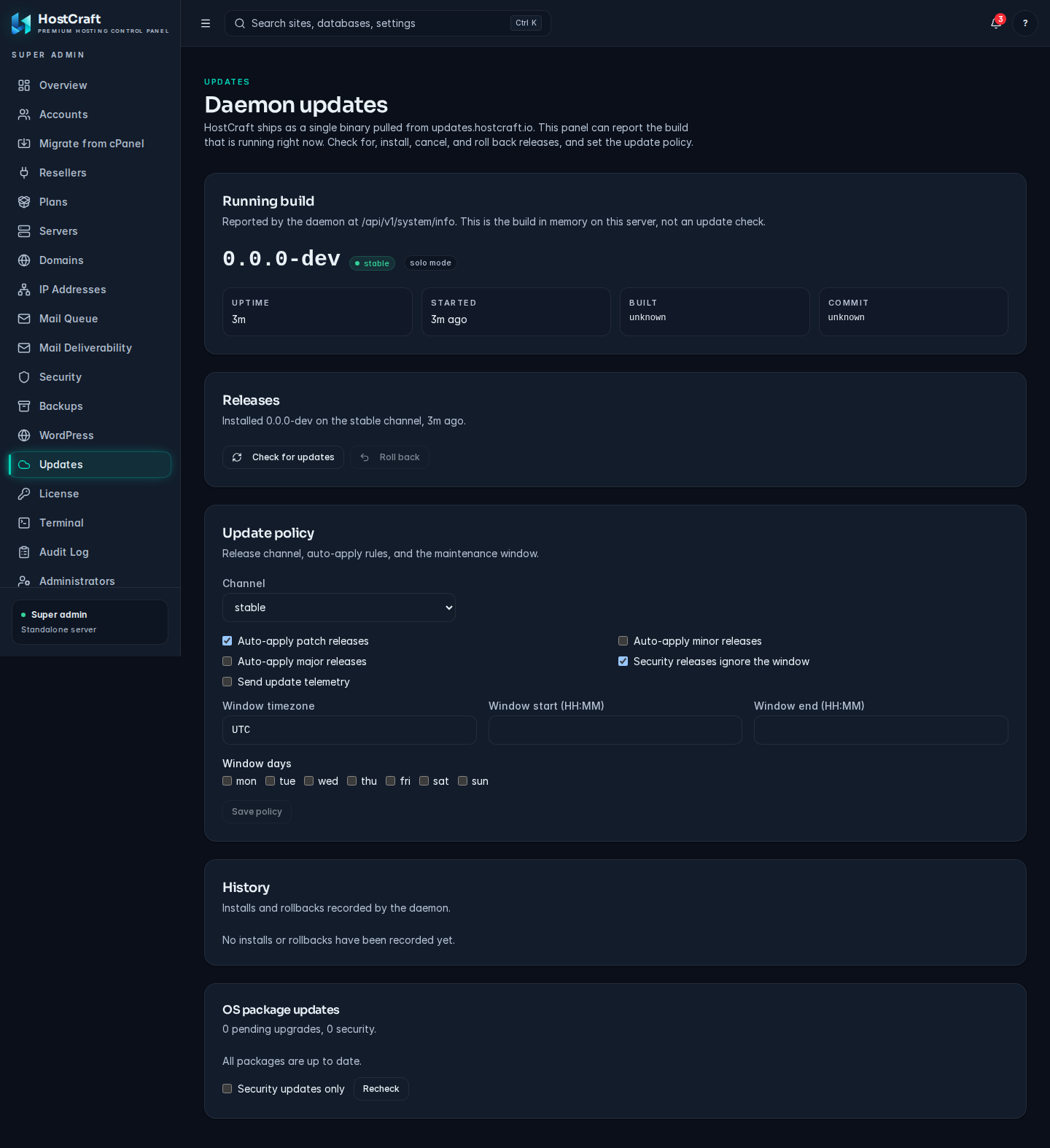
Admin > Updates.
Automatic update behaviour
Section titled “Automatic update behaviour”| Release type | Default behaviour |
|---|---|
Patch (x.y.Z) |
Auto-apply in the customer-defined patch window |
Minor (x.Y.z) |
Notify, require one-click confirmation |
Major (X.y.z) |
Always manual; operator must read the changelog first |
| Security CVE-driven | Override window; applies within 24 hours with advance notice |
Update lifecycle
Section titled “Update lifecycle”There is one update path: the in-panel update (Admin, Updates, or POST /api/v1/update/install). There is no separate update script.
1. Preflight: license, manifest fetch and signature check (ECDSA key at /etc/hostcraft/update/cosign.pub), killswitch, min_from_version, irreversible migrations need force_data_loss_migrations2. Download the binary to /opt/hostcraft/bin/v<version>/, verify size and sha2563. Check there is room for the snapshot, drain workflow runs, write /var/lib/hostcraft/update_plan.json, restart hostcraftd4. While stopped (systemd ExecStartPre, run from the "stable" release): snapshot every SQLite database in /var/lib/hostcraft (VACUUM INTO, a consistent copy) and /etc/hostcraft into /var/lib/hostcraft/snapshots/<from>-to-<to>-<time>/, then point /opt/hostcraft/bin/current at the new release5. The new release starts, runs its schema migrations and is on probation until it answers /healthz (90 seconds)6. Pass: /opt/hostcraft/bin/stable moves to the new release, snapshots beyond the newest 5 and older than 30 days are pruned7. Fail (unhealthy, or 3 failed starts): automatic rollback. The databases and /etc/hostcraft are restored from the step 4 snapshot, so migrations the new release ran are undone, and the old release is started. History shows "auto rolled back"; admins get a notification.Release links under /opt/hostcraft/bin/:
| Link | Meaning |
|---|---|
current |
The running release. /usr/local/bin/hostcraftd points here. |
stable |
Last release that passed its health check. systemd runs its update apply before every start, so a broken new binary cannot block its own rollback. |
previous |
Target of a manual rollback. |
sudo hostcraftd update status prints the links, any pending work, the last apply and rollback, and the snapshots.
Manual rollback
Section titled “Manual rollback”From the panel (Admin, Updates, Roll back) or POST /api/v1/update/rollback. This restores the snapshot taken when the running release was installed: everything changed in the panel since that update is lost (accounts, settings, tokens created since). Customer site files, mail and databases are not touched. A snapshot older than 24 hours needs force_data_loss_migrations: true; skip_state_restore: true (also with the force flag) swaps the binary only.
When the panel itself is unreachable:
sudo hostcraftd update rollback # queue: restore snapshot + previous releasesudo systemctl restart hostcraftd # update apply executes it before startsudo hostcraftd update statusWhat a rollback replaced is kept in <snapshot>/displaced-<time>/ (databases and config), so it can be undone by hand. A rollback request that cannot be executed is moved to /var/lib/hostcraft/update_rollback.failed.json and the current release keeps running.
Backing up the panel state
Section titled “Backing up the panel state”The panel state is the SQLite database at /var/lib/hostcraft/state.db (solo mode) or the PostgreSQL database (cluster panel mode). This is separate from customer account backups.
SQLite (solo mode)
Section titled “SQLite (solo mode)”# Take a manual snapshot (also runs automatically before every update)sudo hostcraftd state snapshot
# List available snapshotssudo hostcraftd state snapshots list
# Restore from a specific snapshotsudo systemctl stop hostcraftdsudo hostcraftd state snapshots restore --snapshot=<snapshot-id>sudo systemctl start hostcraftdsudo hostcraftd doctorSnapshots are stored at /var/lib/hostcraft/snapshots/. Copy them off-box to a separate storage location as part of your backup strategy. The customer account backup system (restic) does not back up the panel state; you must handle this separately.
PostgreSQL (cluster mode)
Section titled “PostgreSQL (cluster mode)”Use pg_dump on a schedule. Pipe directly to your off-site storage:
pg_dump \ --format=custom \ --no-password \ "postgres://hostcraft:pass@localhost:5432/hostcraft" \ | aws s3 cp - s3://your-backup-bucket/hostcraft/$(date +%Y%m%d-%H%M%S).pgdumpRestore:
pg_restore \ --format=custom \ --no-password \ --dbname="postgres://hostcraft:pass@localhost:5432/hostcraft" \ /path/to/backup.pgdumpLicense
Section titled “License”Without a license the server runs on the permanent free tier: 3 hosting accounts and 10 websites, with no WordPress Toolkit installs, mail deliverability suite, resellers, clustering or legacy PHP. The free tier never expires.
hostcraftd license show # state, entitlements, usage, what is blockedhostcraftd license install --file /root/license.jwthostcraftd license refresh # ask the license server for a renewed key nowThe key is verified before it is written to /etc/hostcraft/license.jwt (mode 0640, root:hostcraft). A running daemon picks up a new file within a minute. Super admins can also install a key on the panel's License page; server admins can view and refresh it.
Licensing is compliance tooling, not DRM. It only refuses new writes on the API (creating accounts, sites, resellers, cluster nodes, cPanel imports, and similar). In every state, including an expired license, websites, mail and DNS keep serving, and SSL renewals, backups, restores of existing data, security actions, suspend and delete keep working. After expiry there is a 14 day grace period, then creation is restricted; 90 days after expiry other administrative changes are limited. Setting auth.license_enforcement: warn_only logs every would-be block without blocking.
Build tags reference
Section titled “Build tags reference”| Tag | Effect | When to use |
|---|---|---|
goaccess_real |
Wires GoAccess integration tests against a real GoAccess binary | CI machines with GoAccess installed; not for production builds |
embed |
Embeds the web/dist/ frontend assets into the binary via go:embed |
All production release builds |
Standard production build:
cd daemongo generate ./...go build -tags embed ./cmd/hostcraftdThe same binary serves solo, panel and agent nodes. The embedded nats-server is always built in.
Migrating SQLite to PostgreSQL
Section titled “Migrating SQLite to PostgreSQL”Not supported yet. There is no SQLite to PostgreSQL migration command; a panel that needs PostgreSQL must be installed against it from the start. See Cluster.
Routine maintenance checklist
Section titled “Routine maintenance checklist”| Task | Cadence | Where |
|---|---|---|
Run hostcraftd doctor |
Weekly | CLI |
| Verify backups | Weekly (auto) | Backups -> Repositories -> Verify |
| Review audit log | Monthly | Settings -> Audit |
| Review FIM exceptions | Monthly | Security -> File integrity |
| Review CrowdSec decisions | Weekly | Security -> Blocked IPs |
| Rotate DKIM keys | Every 6 months | Mail -> DKIM |
| Review legacy PHP sites | Quarterly | Sites -> Filter by PHP version |
| Review WP vulnerability scan results | Weekly | Security -> WP Vulnerabilities |
| Update OS packages | Monthly (auto daily for security) | unattended-upgrades runs daily; do a manual sweep monthly |
| Check deliverability dashboard | Weekly | Mail -> Deliverability |
Getting help
Section titled “Getting help”- Keyword search in this documentation site (top right).
- JCR support for licensed customers: email
[email protected]. Include therequest_idfrom any API error and the output ofhostcraftd doctor.