
Security
HostCraft ships with an Imunify360-class security layer built in. All six components are open-source production tools integrated under a single policy engine. None stands alone; every signal feeds into security/policy/ which routes to the appropriate action tier.
Roles and permissions
Section titled “Roles and permissions”HostCraft has six fixed roles. The permission matrix is a hand-maintained table of typed Go constants in daemon/internal/auth/perms/perms.go. There are no runtime permission strings; every API route checks a typed constant, and adding a route means adding its constant there.
| Role | Scope | Notes |
|---|---|---|
super_admin |
Cluster-wide | JCR/vendor operations. Rare. Two-factor required by default (passkey recommended). |
server_admin |
One server | Day-to-day hosting operations. Two-factor required by default (passkey recommended). |
reseller |
Pool of accounts | Manages a subset of accounts. Two-factor optional; can be required in the sign-in policy. |
account_owner |
One account | The hosting customer. Password plus optional 2FA. |
sub_user |
Scoped within one account | Invited by account owner with preset or custom permission scope. Cannot delete parent account or invite further sub-users. |
mailbox_user |
Webmail only | Auth delegates to Dovecot SASL. Never reaches the panel. |
Sub-user preset scopes: billing, developer, mail_admin, readonly_support. Account owners can also build a custom permission set from the generated permission constants (for example web.site.create, mail.mailbox.delete).
Authentication
Section titled “Authentication”Credentials and factors
Section titled “Credentials and factors”Every panel user authenticates with one or more of these credential types:
| Credential | Notes |
|---|---|
| Email and password | Passwords hashed with argon2id, 12-character minimum. HIBP breach check on set and on login. |
| TOTP | RFC 6238 time-based one-time password. Required for reseller and above. Optional for account_owner. |
| WebAuthn passkey | W3C Level 2 ceremony with full attestation chain. Recommended for super_admin and server_admin (a passkey or TOTP is required for them by default). Optional for lower roles. |
| Recovery codes | 10 single-use codes generated at 2FA enrolment. Store offline in a password manager. |
| API tokens | Scoped, expirable, revocable bearer tokens with prefix hcp_live_.... Never grant super_admin or server_admin scope. |
| Magic link | Used for password reset only. Time-bounded (15 minutes), single-use, IP-bound to the request that triggered it. |
Sessions are database-backed, not JWTs. The cookie carries an HMAC plus a session ID; the server validates the HMAC and looks up the live session record. This makes instant revocation and device-list management work correctly.
Destructive actions (deleting an account, site, domain, database or backup repository, removing your authenticator app, and changing the two-factor policy) require re-authentication within the last five minutes even if the session is otherwise valid. The panel prompts for your password, then your passkey or authenticator code if you have one, and retries the action automatically.
WebAuthn enrolment
Section titled “WebAuthn enrolment”The panel enforces two-factor enrolment (a passkey or an authenticator app) for the roles selected under Admin > Settings > Sign-in policy. The default is super_admin and server_admin with a 24-hour grace period, counted from when the user was created or when their role was added to the policy, whichever is later. During the grace period a banner shows the deadline. After it, sign-in still works but the session is limited to the two-factor setup screen until a factor is enrolled.
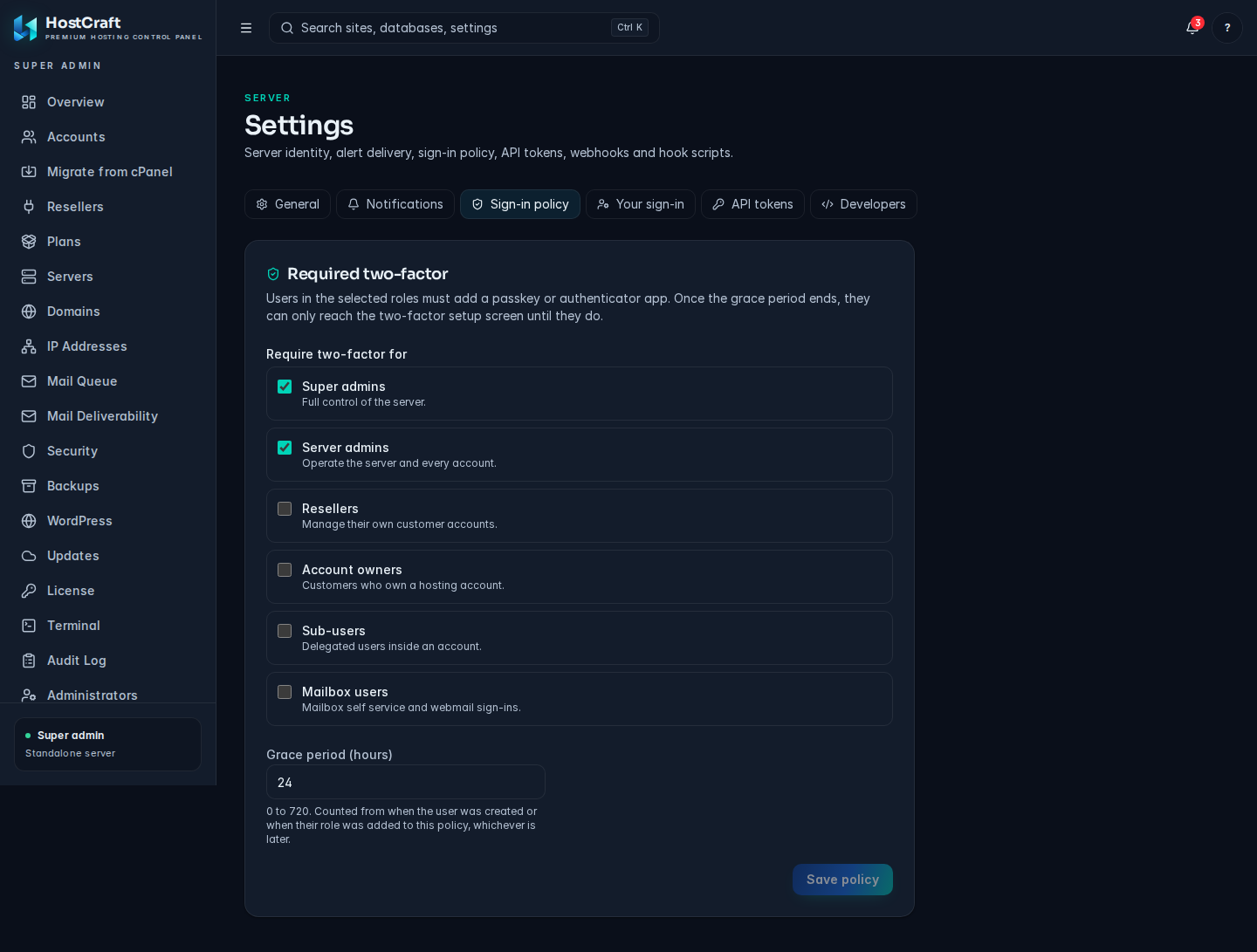
Admin > Settings > Sign-in policy.
To enrol a passkey:
- Log in with your email and password.
- Go to Settings -> Security -> Passkeys.
- Click "Enrol passkey".
- Your browser presents the WebAuthn ceremony. Authenticate with your platform authenticator (Face ID, Touch ID, Windows Hello) or a roaming hardware key (YubiKey, etc.).
- The panel verifies the attestation statement and stores the public key credential. The ceremony uses the
directattestation conveyance preference so the attestation chain is preserved for audit. - Click "Done". On the next login the passkey prompt appears in place of the password field for browsers that support conditional UI.
You can enrol multiple passkeys per account (recommended: one platform key and one hardware key as backup). Manage enrolled keys under Settings -> Security -> Passkeys.
Brute-force protection
Section titled “Brute-force protection”| Trigger | Response |
|---|---|
| 5 failed logins for one account in 15 minutes | Account lockout, email alert to account owner |
High request rate on /login from one IP |
Per-IP rate limit via Coraza, escalates to CrowdSec block |
| Login from a new country | Geolocation alert (not a block) with a re-authentication prompt |
| Optional IP allowlist for admin/reseller | Configured under Settings -> Security -> Allowlist |
Audit log
Section titled “Audit log”Every state-changing call appends a record to the audit_log table with: actor ID, actor role, source IP, action name, target entity, before/after JSON snapshot, outcome (success/failure), and error details. The table is append-only; no process may update or delete rows.
Default retention is one year. Configurable under Settings -> Audit.
Query the log from the CLI:
# All audit events for an account in the last 7 dayshostcraftd audit search --account=acme --since=7d
# Security-related events server-widehostcraftd audit search --category=security --limit=100
Web terminal
Section titled “Web terminal”Account owners (Terminal in the sidebar) and server admins (Admin, Terminal, then pick an account) can open a browser shell over /ws/terminal. The shell is /bin/bash running as the account's own unix user inside a transient systemd unit (hostcraft-term-<user>-<id>), started with systemd-run:
ProtectSystem=strictandProtectHome=tmpfswith only the account home bound back in, so/homeshows that one account and everything outside the home is read only.- Panel config, state, TLS keys and other service secrets (
/etc/hostcraft,/var/lib/hostcraft,/root,/etc/ssl/private,/etc/letsencryptand similar) are inaccessible. NoNewPrivileges,RestrictSUIDSGID, private/tmp, hidden process list (ProtectProc=invisible), and kernel tunables, modules and cgroups protected.- Limits: 1 GiB memory, 256 tasks, one CPU, 8 hour maximum lifetime.
Sessions close after 15 minutes without input, at most 3 run per account, and suspended accounts cannot open one. Every open and close is written to the audit log (terminal.session.open, terminal.session.close, with the duration and the reason it ended). Keystrokes are not recorded. The permission is TerminalAccess: server admins and account owners hold it, resellers and mailbox users do not, and sub users get it through the developer preset or an explicit grant.
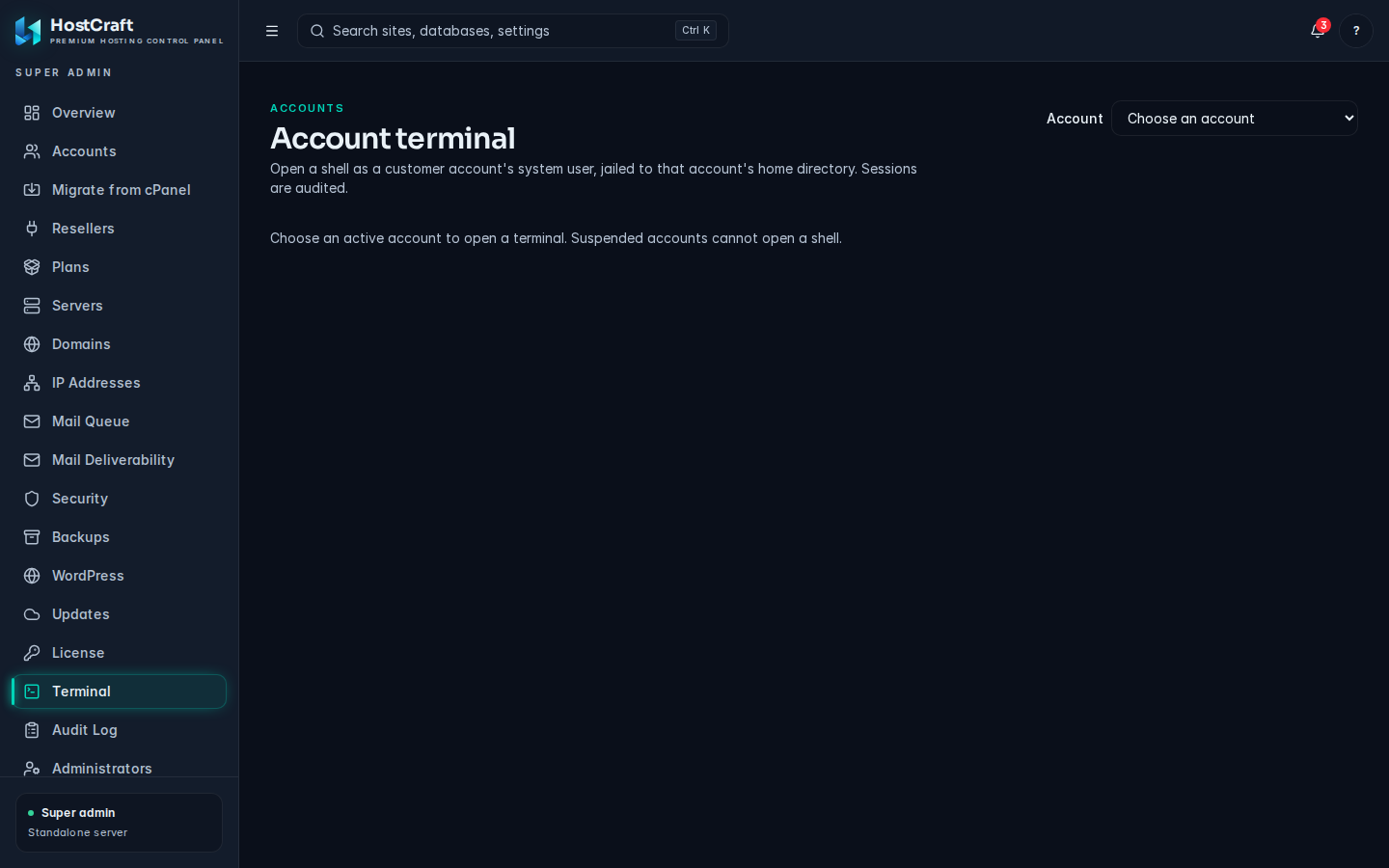
The browser terminal runs as the account user inside a restricted systemd unit.
Cluster mTLS
Section titled “Cluster mTLS”When running in cluster mode (server.mode: panel or server.mode: agent), all daemon-to-daemon communication is authenticated with mutual TLS.
CA bootstrap
Section titled “CA bootstrap”Running hostcraftd cluster init on the panel node:
- Generates a 4096-bit RSA CA key pair at
/etc/hostcraft/cluster/ca/. - Issues a self-signed root certificate valid for 10 years.
- Issues a server certificate for the panel node signed by the CA.
- Prints the CA fingerprint (SHA-256 of the DER-encoded root certificate) and a 24-hour enrolment token.
Keep the CA private key offline after bootstrap. The panel never needs to re-read it except to issue new node certificates.
Agent join
Section titled “Agent join”When an agent runs hostcraftd join <panel-url>:
- The agent generates a fresh 2048-bit RSA key pair.
- It sends a certificate signing request to the panel's
/api/v1/cluster/enrolendpoint, authenticated with the enrolment token. - The panel verifies the token, signs the CSR with the cluster CA, and returns the signed certificate.
- The agent pins the CA certificate (matched against the fingerprint printed during
cluster init), persists its node certificate to/etc/hostcraft/cluster/nodes/<node-id>/, and writescluster.mode=agentto config. hostcraftdexits and systemd restarts it in agent mode.
From this point all panel-to-agent and agent-to-panel calls present their node certificates. The TLS handshake verifies both sides against the cluster CA.
Bus authorization
Section titled “Bus authorization”The panel's embedded NATS server authorizes every agent by the common name of its verified client certificate, which is the agent's node id. An agent may only:
- receive commands addressed to its own node id, and broadcasts
- publish events under its own node id
- reply to the requests it received
An agent cannot read another node's commands, impersonate another node's heartbeat, or send commands to any node. Only the panel's own in-process connection, which presents a random token generated at each boot, may send commands. A revoked certificate fails the TLS handshake.
Accounts hosted on agents
Section titled “Accounts hosted on agents”When an account is placed on an agent node, the panel still authenticates every request: the session or API token, MFA policy and role checks run on the panel. A request for that account's sites, databases, mail, DNS, SSL, cron, files or backups is then sent to the agent over the bus with the principal the panel resolved (user, role, account, reseller). The agent runs it through its own REST handlers and domain modules, so the same permission checks and tenant scoping apply again on the agent. The forwarded principal is carried in process only; no network request to an agent can present one.
While an account moves between nodes (see Cluster mode -> Move an account), the panel answers 423 Locked to any change to it, and the move steps run as the system principal on both nodes.
Certificate rotation
Section titled “Certificate rotation”The four-step rotation saga runs on a schedule (default: 90 days before expiry) or on demand per node from Admin -> Servers or the cluster nodes API.
| Step | What happens |
|---|---|
| 1. New cert issued | Panel issues a new certificate for the target node, still signed by the existing CA. The node receives it and writes it alongside the old cert. |
| 2. Dual-cert window | For the 10-day grace period the node presents both the old and new cert on every handshake. Peers accept either. |
| 3. Switch | The node promotes the new cert to primary. Old cert remains in the fallback slot. |
| 4. Retire | After 10 days the old cert is removed. Any peer still holding the old cert fingerprint must re-enrol. |
If the CA itself must be rotated (rare, typically after a key compromise), the procedure is: issue a new CA, cross-sign the old CA with the new CA, roll out the new CA to all nodes as a trusted root, then revoke the old CA. Detailed playbook in the runbooks section.
The six-component security stack
Section titled “The six-component security stack”| Component | Tool | Location in daemon |
|---|---|---|
| WAF | Coraza with OWASP CRS | internal/security/waf/ |
| Reputation and brute force | CrowdSec | internal/security/crowdsec/ |
| Malware scanning | ClamAV daemon and LMD signatures | internal/security/malware/ |
| PHP RASP | Snuffleupagus | internal/security/rasp/ |
| File integrity monitoring | inotify watcher with baseline DB | internal/security/fim/ |
| Outbound monitor | nftables counters and daemon analyzer | internal/security/network/ |
WAF (Coraza)
Section titled “WAF (Coraza)”Coraza is a Go library embedded directly in the daemon, not a separate process. The OWASP CRS bundle loads at daemon start from /etc/hostcraft/security/waf/owasp-crs/. Every customer HTTP request is checked by Coraza before nginx serves it: nginx sends the request line and headers to the daemon over loopback, and for requests with a body (form posts, JSON APIs, uploads) it sends the body as well. nginx reads the body once and hands the same buffered copy to the site after the check, so PHP and proxied apps see the request unchanged.
Body inspection is bounded so large uploads stay cheap:
- URL-encoded, JSON, XML, plain text and bodies with an unknown or missing content type: up to
waf_max_body_bytes(8 MiB by default) is inspected. A body larger than that is refused with413 Request Entity Too Largeand recorded as a WAF event with rulehostcraft-body-limit, because the part past the budget could not be checked. multipart/form-data: every form field is inspected (up to the same budget across all fields). Uploaded file content is skipped, whatever its size; file names and part headers are still inspected, and a body with more than 1000 parts or oversized part headers is blocked (hostcraft-multipart-limit). Uploaded files are covered by the malware scanner instead.- An inspection that takes longer than 10 seconds is blocked (
hostcraft-inspect-timeout) rather than allowed, so a body crafted to be slow to inspect cannot slip through on a timeout. At most half the CPU cores run body inspections at once; a request waiting for a slot counts toward the same 10 seconds.
Large bodies are inspected in two tiers, because the full OWASP CRS costs roughly 3 seconds of CPU per MiB of one large free-text field or XML element (measured on the development VM, October 2026):
- Bodies up to
waf_full_inspect_body_bytes(1 MiB by default) go through the full CRS. - Larger bodies, up to
waf_max_body_bytes, still get the full CRS on the request line, headers and query string. The body itself gets a fast linear pass instead: every decoded value (each form field, JSON string, XML text node or attribute, multipart field, or the raw body for other types or when it does not parse) is checked with libinjection, the same SQL injection and XSS detectors the CRS uses. A hit is blocked with403and recorded as a WAF event with rulehostcraft-large-body-sqliorhostcraft-large-body-xss. The other CRS rule families (command injection, file inclusion, PHP injection and so on) do not run on bodies above the threshold.
The fast pass handles a full 8 MiB body in well under a second on the development VM (40 ms for one 8 MiB form field, about 0.4 s for an 8 MiB page-builder JSON save, about 0.65 s for 6 MiB of keyword-heavy prose). The 10 second deadline stays in place as a backstop.
Per-site opt-out. A server administrator can turn the oversize block off for one site under Websites -> Settings -> Firewall ("Block request bodies too large to inspect"), or with waf_allow_oversize_body: true in PUT /api/v1/sites/{id}/settings (changing it needs the SecurityPolicyWrite permission; account owners see it read-only). With the block off, the first 1 MiB of an oversize body is inspected and the rest reaches the site unchecked. The prefix is kept at 1 MiB (not the full budget) so that inspecting free text finishes well inside the 10s deadline; a larger prefix would turn the opt-out into a timeout block.
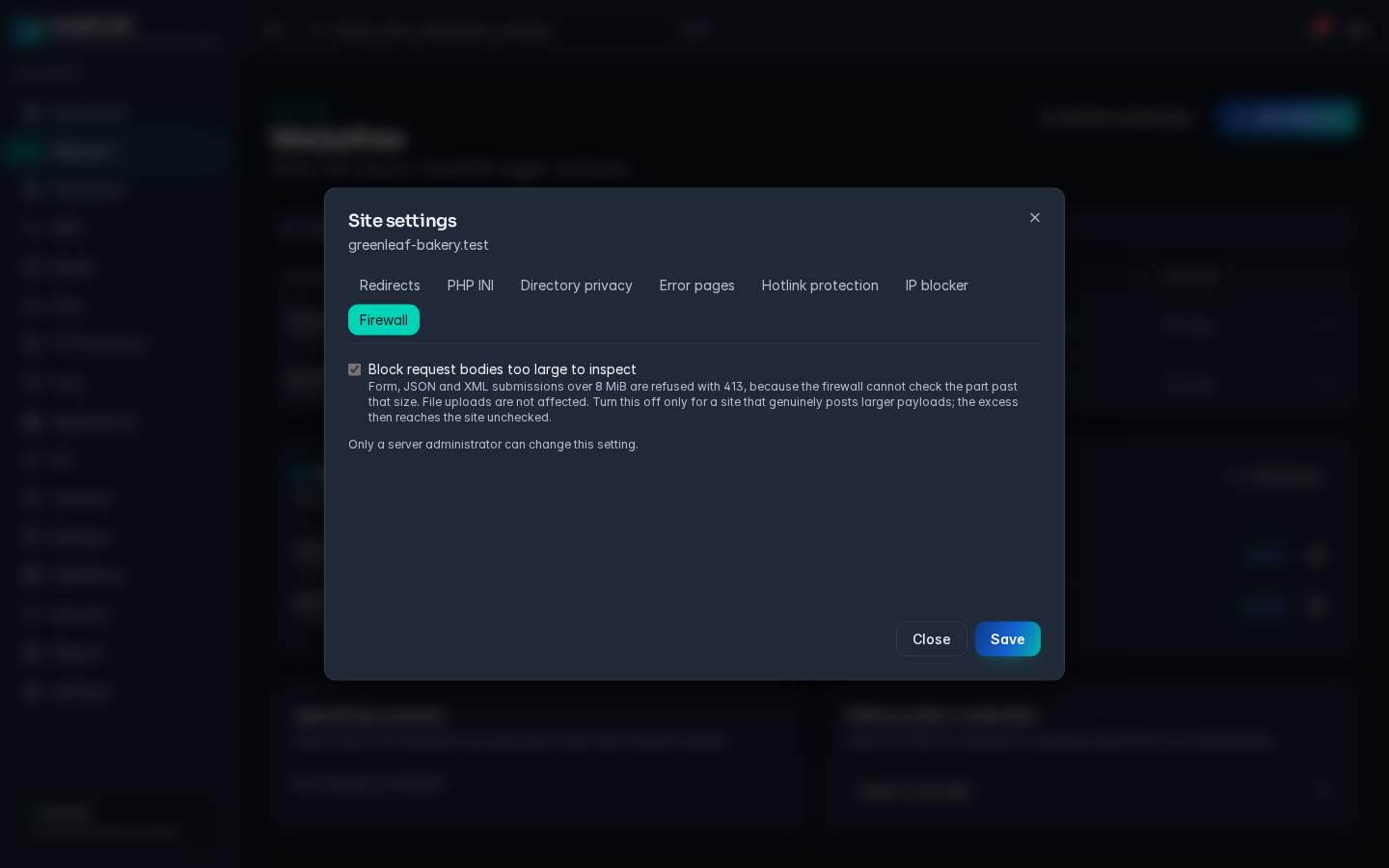
Websites > Settings > Firewall: the per-site oversize body option.
Otherwise the WAF fails open. If the daemon is restarting, unreachable or hung (1 second to connect; 3 seconds to answer the header check, 12 seconds for the body check), the request is served, so the panel can never take hosted sites offline.
To change the inspection budget or the full-CRS threshold, set them in /etc/hostcraft/config.yaml and restart the daemon:
security: waf_max_body_bytes: 4194304 waf_full_inspect_body_bytes: 524288Legacy PHP sites (5.6 through 7.3) receive an additional legacy-CMS rule bundle covering patterns from old WordPress, Magento 1, OpenCart 1.x, and vBulletin.
Per-site WAF rule exclusions are not yet exposed in the panel or CLI. If a CRS rule blocks legitimate traffic, review the event under Security -> Events and contact support; the WAF fails open if its inspection service is unavailable.
Reputation and brute force (CrowdSec)
Section titled “Reputation and brute force (CrowdSec)”CrowdSec parses logs from nginx, SSH, FTP, the mail stack, and the panel login endpoint. Ban decisions are pushed as nftables drops via the installed bouncer. Community blocklists are pulled at daemon start and refreshed every 4 hours.
To lift an active ban, remove it under Security -> Blocks (DELETE /api/v1/security/blocks/{id}). To permanently allowlist an office IP in CrowdSec, add it with cscli on the server (see the CrowdSec allowlist documentation).
Malware scanning (ClamAV and LMD)
Section titled “Malware scanning (ClamAV and LMD)”Scans run on three triggers: scheduled (nightly), on-upload (the FPM pool hooks into ClamAV on file write), and on-write (inotify triggers a targeted scan when a PHP file appears in a doc root).
When ClamAV or LMD finds malware, the file is moved to /var/lib/hostcraft/quarantine/<account>/<timestamp>/ and replaced with a stub in the doc root. Auto-delete is off by default; the account owner reviews the quarantine and confirms clean or restores. An opt-in auto-delete tier is available for customers who want it.
PHP RASP (Snuffleupagus)
Section titled “PHP RASP (Snuffleupagus)”Snuffleupagus is loaded as a PHP extension for every FPM pool. The daemon generates per-pool rulesets via the configwriter pattern. Legacy PHP pools get a stricter ruleset that blocks:
- Unserialize attacks on user-controlled input
- File inclusion exploits
- Dangerous function calls not already in
disable_functions - XXE attacks in upload handlers
File integrity monitoring (FIM)
Section titled “File integrity monitoring (FIM)”An inotify watcher runs inside the daemon and watches all account doc roots. A baseline is taken at account creation. Any new PHP file, modified core file, or unexpected upload raises a Tier 1 alert and asks the account owner to confirm via the Security tab.
FIM fires regardless of source IP; even an allowlisted IP that writes a suspicious file still triggers the alert.
Outbound monitor
Section titled “Outbound monitor”nftables byte-and-packet counters on per-account egress chains feed into a daemon analyzer that detects sustained outbound anomalies. Patterns that match a DDoS or mass-mailer profile escalate to Tier 4 (automatic site suspension). The threshold is configurable per plan tier.
Policy engine
Section titled “Policy engine”The policy engine (security/policy/) aggregates signals from all six components and routes each signal to an action tier. All routing decisions are logged to the audit log.
| Tier | Name | Effect |
|---|---|---|
| 1 | Alert | Audit log entry, dashboard surface, email to account owner |
| 2 | Throttle | Rate-limit the offending source IP or site |
| 3 | Block | nftables drop on the source IP, file quarantined, account locked |
| 4 | Suspend | Site taken offline pending admin review |
Default policy mappings:
| Signal | Default tier |
|---|---|
| Brute force on panel, SSH, FTP, or mail | 3 (CrowdSec block) |
| Malware found by ClamAV or LMD | 1 (alert) plus quarantine |
| Outbound DDoS or mass-mailer pattern | 4 (suspend) |
| WAF block volume above threshold | 2 (throttle source IP) |
| FIM: unexpected new PHP file in doc root | 1 (alert, ask customer to confirm) |
| WAF rule violation on a legacy-PHP site | Escalate faster, stricter thresholds |
Customer firewall
Section titled “Customer firewall”Account owners can manage an additional firewall layer scoped to their own account under Security -> Firewall. Customer rules are applied after the server-level CrowdSec chain. Customer rules can:
- Allow or deny source IP ranges
- Allow or deny by country
- Set custom port rules within a vetted whitelist
Admins can always override customer firewall rules from the server-level Security panel.
Loopback guard
Section titled “Loopback guard”The daemon listens on 127.0.0.1:7700 behind Caddy. On a shared host every tenant process (PHP-FPM workers, cron jobs, SSH and SFTP shells) could otherwise open that port directly and send headers such as X-Forwarded-For that the daemon only expects from Caddy. The loopback guard closes that path.
At start the daemon loads its own nftables table, inet hostcraft_loopguard. Its output hook rejects (TCP reset) connections to 127.0.0.0/8 and ::1 on the daemon's loopback ports (server.listen_addr, plus server.grpc_addr when set) whenever the socket owner is in the regular user range from /etc/login.defs (UID_MIN to UID_MAX, normally 1000 to 60000). Hosting accounts are created in that range. Root, Caddy, nginx, the hostcraft user and other package service users are system accounts below UID_MIN and are not affected; service users pinned inside the range (such as vmail, uid 5000) are exempted by uid.
- Account users use the panel through Caddy on port 2087, like any browser. Git push-to-deploy hooks call the panel the same way (
https://<panel>:2087, pinned to 127.0.0.1). - Operator logins with a regular uid (for example the
ubuntuuser) are also blocked from the raw port. Usesudo, or the gRPC Unix socket with an API token. - The table is separate from ufw, firewalld, CrowdSec and the HostCraft blocklist table, so none of them overwrite it. A drop-in for
nftables.servicere-applies it after the distro ruleset loads or reloads, and the daemon checks every 30 seconds and re-applies it if another tool flushed the ruleset. - Check it with
nft list table inet hostcraft_loopguard(the rules carry counters). Disable it only withsecurity.disable_loopback_guard: trueinconfig.yaml, then restart the daemon.
Reading the Security tab
Section titled “Reading the Security tab”The Security tab in the panel is a unified view across all six components.
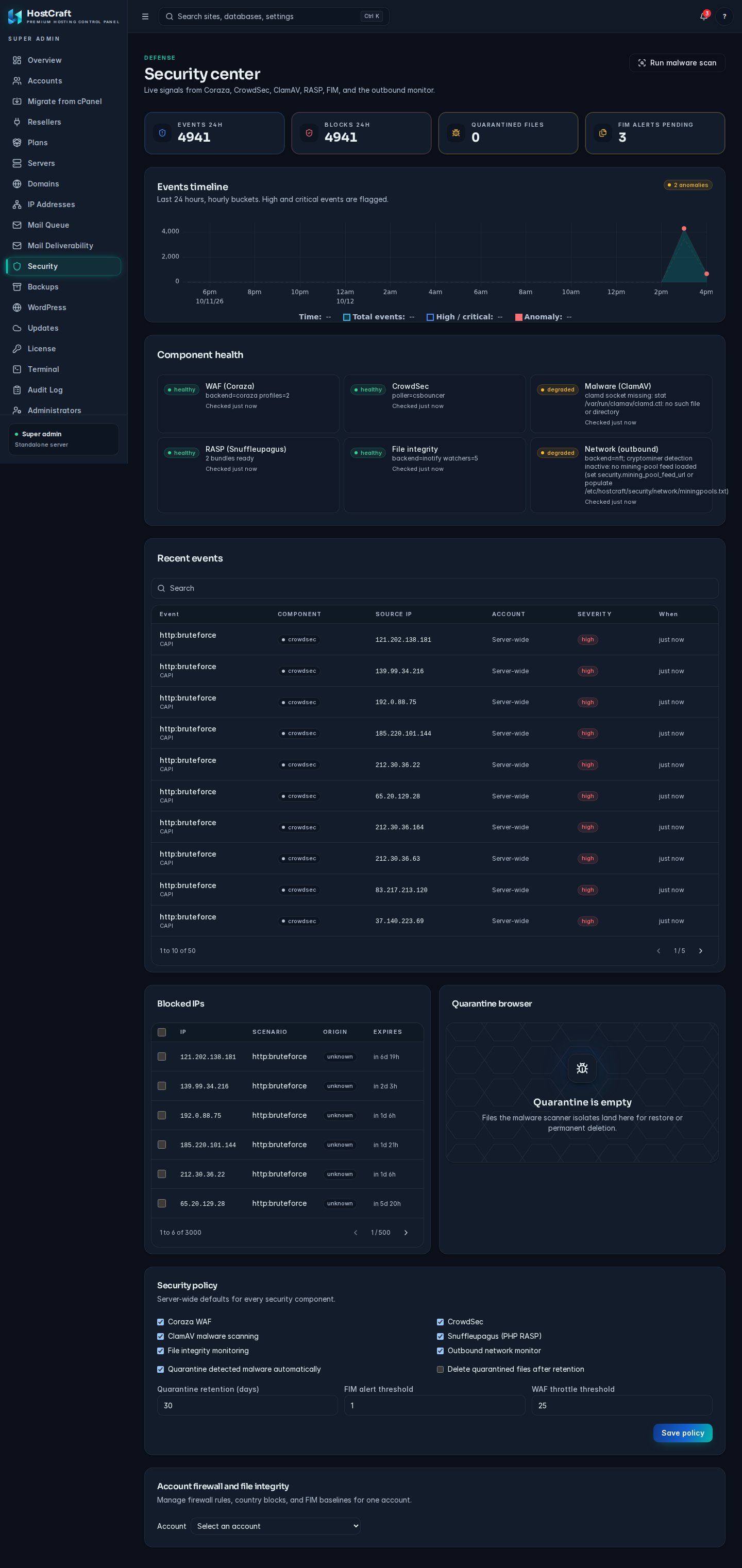
The admin Security center.
| Widget | What it shows |
|---|---|
| Live threat counter | Blocks per minute over the last 24 hours (sparkline) |
| Recent events feed | Chronological list of every Tier 2 or higher action |
| Blocked IP list | CrowdSec decisions plus manual blocks, per-IP reason and expiry |
| Malware quarantine browser | Per-account view of quarantined files with confirm-clean and restore actions |
| WAF rule whitelist | Rules currently silenced with reason, site scope, and operator |
| FIM baseline review | Doc-root file changes the account owner has not yet acknowledged |
| Outbound graph | Per-site outbound bandwidth and connection-count anomaly score |
OS patch management
Section titled “OS patch management”unattended-upgrades is configured for distro security packages on Ubuntu and runs daily. Do a manual review monthly with:
apt list --upgradable 2>/dev/null | grep -i securityHostCraft does not integrate a live kernel patching service. Apply kernel updates through the distro package manager and schedule a reboot window; if you run a third-party live patching agent, install and manage it outside the panel.