
Migrating from cPanel
cPanel restore is a v1 release criterion for HostCraft. The migration tooling is exercised against real-world cPanel servers running production workloads, with backups of mixed sizes, account counts, and add-on configurations. This page is the operator-facing playbook for that migration.
What HostCraft maps from cPanel
Section titled “What HostCraft maps from cPanel”The restore module reads cpmove-<user>.tar.gz from /scripts/pkgacct. It maps each cPanel concept to a HostCraft entity.
| cPanel | HostCraft |
|---|---|
| cPanel user | account_owner plus a unix acct_<id> |
| Main / addon / parked / subdomain | domain and subdomain records |
| MySQL database | db record |
| Email account | mailbox |
| Forwarder, autoresponder, filter | mail records |
| BIND zone | PowerDNS zone |
| AutoSSL | re-requested via Let's Encrypt |
| Custom-uploaded SSL | installed via the ssl module |
| Crontab | cron_job |
| FTP user | ftp_user |
| Mailman list | mailing list (address, owners, members); moderation queue, archives and pending requests are not migrated and the job reports a warning per list. A list with no owners becomes a forwarder |
| Softaculous | skipped in v1 with warnings |
The 14 hard edge cases
Section titled “The 14 hard edge cases”Every restore translator handles one of these. Each has a unit test against a real cPanel fixture; do not assume the cPanel field formats from documentation alone.
| # | Case | Behaviour |
|---|---|---|
| 1 | PHP version unavailable on HostCraft | Snap to nearest with a warning, or override via --php-version= |
| 2 | .htaccess Apache rules |
Translator handles common patterns; complex rules flagged for manual review |
| 3 | Custom MX (Google Workspace etc) | Preserved exactly; never auto-rewritten |
| 4 | mbox vs Maildir | mbox auto-converted to Maildir |
| 5 | Mail password hashes | Compatible imported as-is. Incompatible triggers a force-reset email. |
| 6 | External DNS (Cloudflare, Route 53) | Detected via NS divergence. Records imported, authority not claimed. |
| 7 | SSL certificates | Custom imported, AutoSSL re-requested fresh from Let's Encrypt |
| 8 | Apache Include directives |
Best-effort translation, otherwise flagged |
| 9 | mod_security custom rules | Default OWASP CRS only in v1; customisations flagged |
| 10 | Per-account php.ini |
Translated to per-pool php_admin_value |
| 11 | Quota exceeds plan | Pre-flight refusal with a clear, actionable message |
| 12 | Catch-all email | Mapped to a HostCraft catch-all |
| 13 | Nested subdomain on addon | Flattened, original hierarchy retained in metadata |
| 14 | MariaDB vs MySQL collation | Imported with explicit charset and collation; differences logged |
The migration pipeline
Section titled “The migration pipeline”upload cpmove-*.tar.gz | vprobe-only extract -> preview report | voperator confirms targets and options | vpre-flight checks - plan limits - domain collisions - DB collisions - disk space - PHP version availability - cPanel version supported | vworkflow saga (compensations on each step) - account create - domain create - DB import - mail provisioning - DNS zone import - SSL provision - cron install | vper-site validation - HTTP probe - DB roundtrip - mailbox auth - DNS load - SSL chain | vstructured report with manual-action listLive transfer from a WHM server
Section titled “Live transfer from a WHM server”For more than a handful of accounts, pull them straight off the running cPanel server instead of uploading archives one at a time. In the admin panel open Migrate from cPanel and use Transfer from a live cPanel server.
- Add the source server. Give the hostname or IP, the SSH port and the root password or a root private key. HostCraft connects once, checks that
/usr/local/cpanel/scripts/pkgacctexists, and pins the SSH host key it was shown (or theSHA256:...fingerprint you typed). Every later connection must present that same key; if the old server is rebuilt, verify its new key withssh-keygen -lf /etc/ssh/ssh_host_ed25519_key.puband use Trust new host key. Credentials are encrypted at rest with the panel secret and are never shown again. An optional WHM API token (WHM, Manage API Tokens) lets the account list come from the WHM API on port 2087; without one it comes fromwhmapi1over SSH.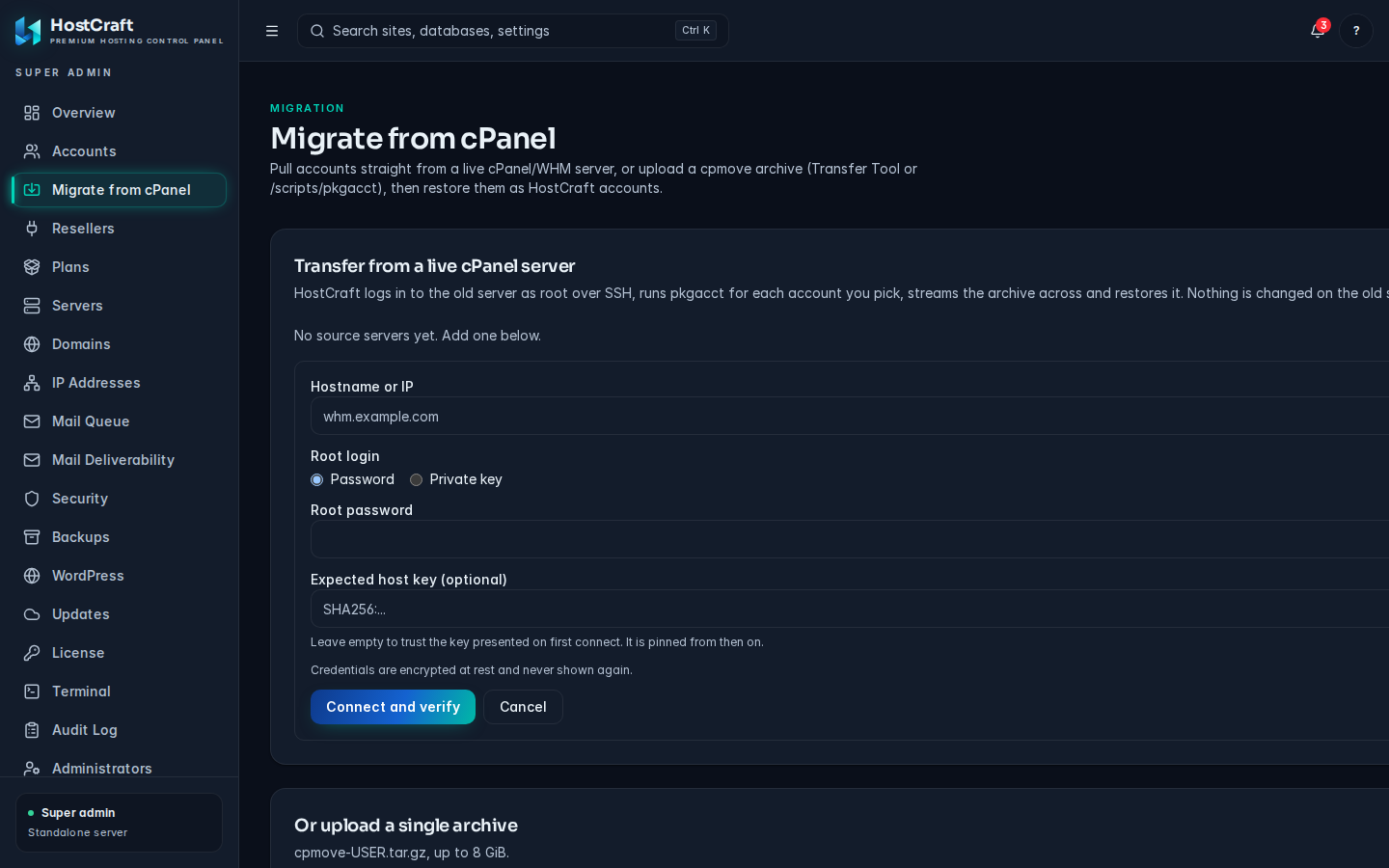
Step 1: add the source server.
- Choose accounts. The full account list shows owner, package and disk use. Filter, select, pick how many run at once (1 to 8; 2 is a safe default on a busy source server), the target plan (by default the plan whose name matches the cPanel package) and reseller, and which parts to include.
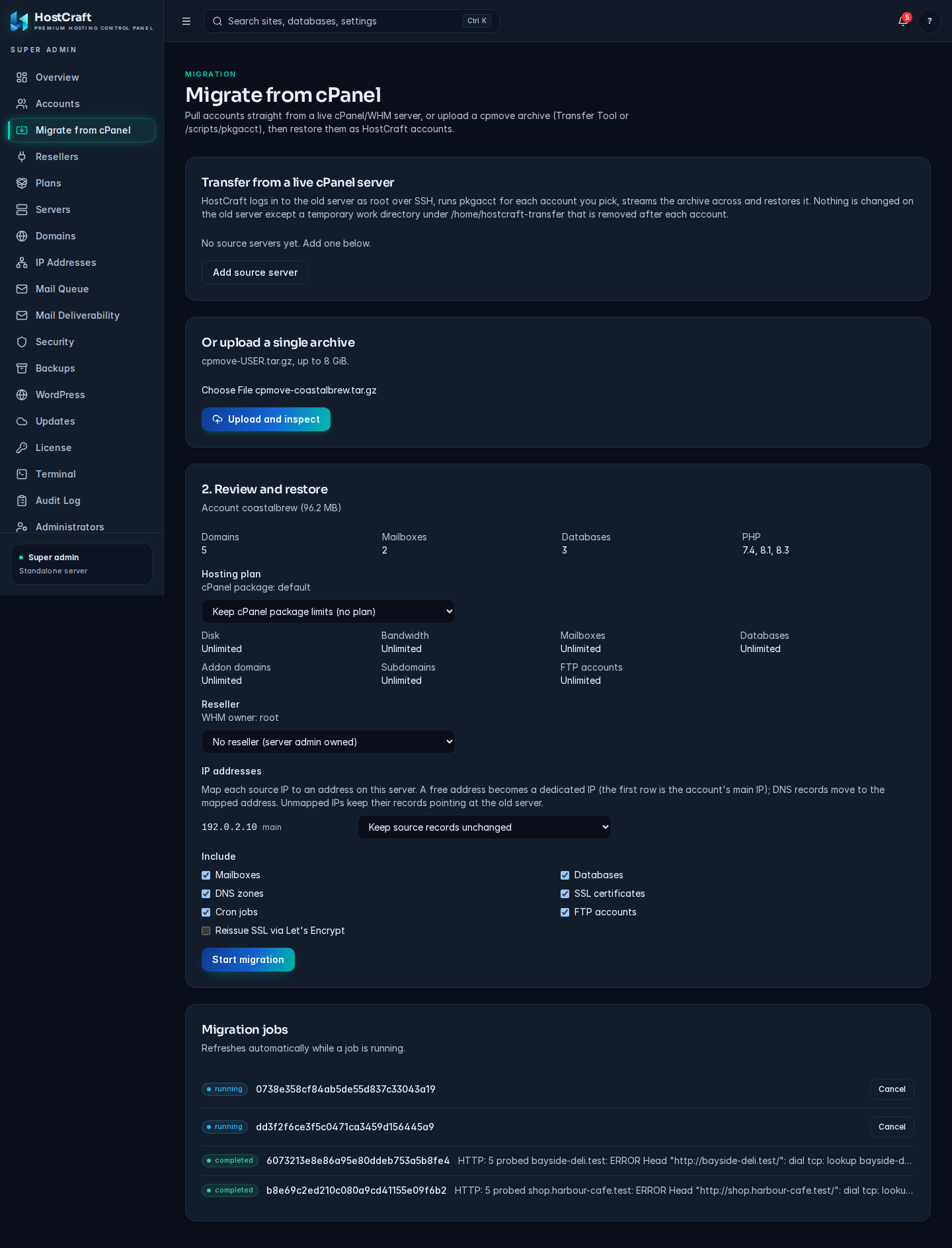
Review the account, plan, reseller and options, then start the migration.
- Watch the batch. Each account moves through
packaging(pkgacct runs in a private directory under/home/hostcraft-transferon the source),downloading(the archive streams over SSH and its sha256 is checked against the source),restoring(the normal restore pipeline above) andcompleted. The remote work directory is removed after each account. Failed accounts (for example a username that already exists here) show the reason and can be retried. Cancelling a batch stops queued and in-flight packaging; accounts already restoring finish.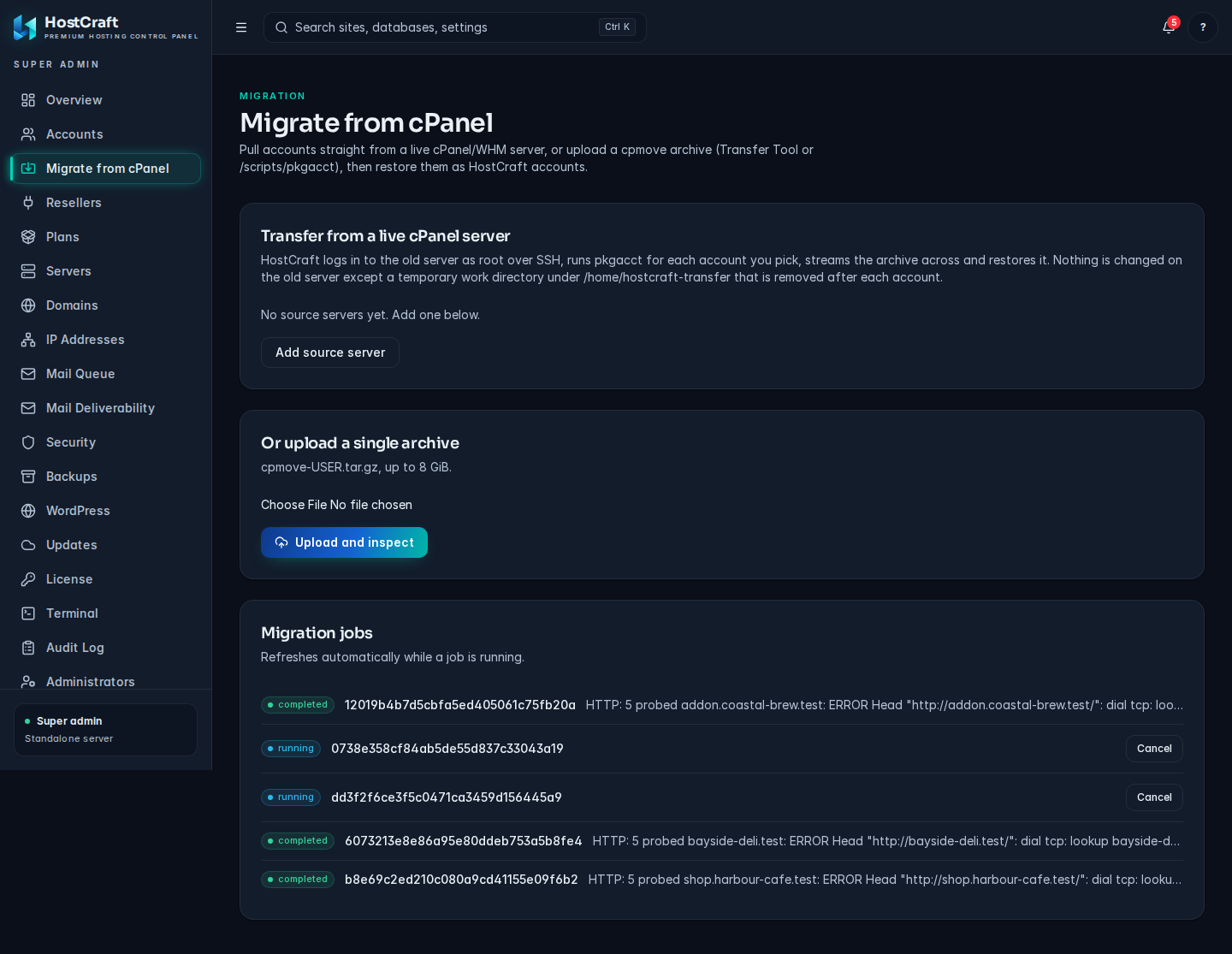
Migration jobs refresh automatically and show the per-site validation result.
- Final sync before DNS cutover. Sites keep changing on the old server while the batch runs. Right before step 5 of the cutover playbook, run Run final sync on the batch (or Sync now per account). It copies every file in the home directory modified on the source since that account was packaged, and imports mail that arrived since, into the HostCraft mailboxes. It never deletes anything here, and skips
.cpanel,etc,ssl,.ssh,tmpand logs. It can be run again; each run starts where the previous one ended. Database changes are not part of the delta: put dynamic sites in maintenance mode, or re-run their account transfer, if their databases change during the window.
Requirements on the source: root SSH reachable from the HostCraft server, GNU tar (standard on every cPanel OS), and enough free space under /home for the largest single account archive times the concurrency.
Cutover playbook (per site)
Section titled “Cutover playbook (per site)”This is the seven-day fallback procedure. Follow it for every customer migration.
- Restore on HostCraft, no DNS cut. Transfer the account live from WHM (or upload the cpmove tarball) and run the restore. Note the per-site report.
- Side-by-side curl comparison. Hit the site on the cPanel source IP and the HostCraft target IP with
curl --resolve <domain>:443:<ip> .... Diff the response codes, headers, and key page bodies. - Customer notify. Email the customer that migration is staged and ready for cut. Confirm the maintenance window and any test logins they want to verify.
- Lower TTL on source. On the cPanel side, drop the zone TTL to 5 minutes. Wait for global propagation (typically 30 minutes on a previous TTL of 4 hours; longer if TTL was 24h).
- Cut DNS to HostCraft. Update authoritative records. Watch DNS propagation in real-time via the panel's DNS monitor.
- Monitor mail flow for 24 hours. Mail is the highest-stakes part of any cut. Watch the Postfix queue, the Rspamd score distribution, and bounce rates.
- Keep the source live for 7 days. Two reasons: late-resolving caches that still hit cPanel, and the operational safety net of a known-good fallback if HostCraft surfaces an issue not caught in pre-flight.
- Decommission. After seven clean days, take the cPanel account offline and reclaim the resources.
What the 14 edge cases mean for the operator
Section titled “What the 14 edge cases mean for the operator”Most migrations finish cleanly with green checkmarks across all 14. The cases that do trigger manual action are usually:
- Case 2 (htaccess) on heavily-customised WordPress builds. Look at the flagged rules; most are caching or canonicalisation that nginx already handles natively.
How .htaccess files are handled
Section titled “How .htaccess files are handled”nginx never reads .htaccess. During the restore HostCraft walks every site's document root, translates each .htaccess file into nginx rules for that site (rewrites with their conditions, redirects, force HTTPS, <Files> and directory deny rules, password protected directories, error pages, headers) and tests the result with nginx -t before it goes live. Document root php_value lines are moved into the site's PHP settings. Anything that cannot be translated faithfully is listed in the restore report and under Websites > Rewrite rules (.htaccess).
Customers keep editing .htaccess after the move. The Translate .htaccess button on the same screen re-reads the files and applies the new rules; nothing changes on disk until nginx accepts them. Server administrators can also add raw nginx rules for a site on the Custom nginx rules tab.
- Case 5 (incompatible password hashes). Customer mailboxes get a one-time reset email. Communicate this in advance.
- Case 7 (custom SSL). If the customer pinned a specific certificate, import it. Otherwise let HostCraft auto-provision via Let's Encrypt; the cutover triggers a fresh issue.
- Case 9 (custom mod_security rules). v1 ships OWASP CRS only. If a customer relies on bespoke ModSec rules, HostCraft surfaces them in the report so the operator can replicate via Coraza or whitelist intentionally.
Mail sent through localhost port 25
Section titled “Mail sent through localhost port 25”HostCraft refuses mail submitted on port 25 without a login, even from the server itself. Sites that were set up on cPanel to send through localhost or 127.0.0.1 on port 25 with no login will have their mail refused. PHP mail() still works.
When you inspect an archive, HostCraft does a quick, bounded scan of likely settings files (wp-config.php, .env, Joomla configuration.php, Laravel config/mail.php) and the WordPress options table in the database dumps for the common SMTP plugins. Each affected site is listed under Check before restoring on the review screen, and the restore is not blocked. If a plugin is installed but its settings cannot be read, the warning asks you to verify them. Custom PHP scripts are not scanned. To fix a site, switch it to PHP mail, or to port 587 with the mailbox login.
Skipped from v1
Section titled “Skipped from v1”Plesk and DirectAdmin restore are phase 4; their formats and concepts are different enough to warrant their own translator suites. Reverse export (HostCraft -> cPanel) is not in v1 either; customers leaving get standard-format files plus database dumps plus DNS exports manually. Live differential migration (sync changes between restore and cutover) is intentionally not built; the seven-day fallback is the safer story.
When something goes wrong
Section titled “When something goes wrong”If a migration surfaces an issue on day three of the seven-day window, the recovery is to point DNS back at the cPanel source. Because the source has been up the whole time, this is a five-minute DNS change, not a recovery from backup. That is the entire reason the seven-day window exists.